
Multi-Model LLM Orchestration: Route, Balance & Manage Models
Learn how multi-model LLM orchestration works in production. Routing, load balancing, fallbacks, observability, and how to architect a unified control layer.

Sohrab Hosseini
Co-founder (Orq.ai)

Key Takeaways
Single-model architectures break architecturally, not just financially. Scattering routing and policy logic across dozens of services makes it impossible to change models or respond to outages without rewriting your entire product.
Multi-model orchestration centralizes routing, load balancing, and governance into one control layer, so model changes become configuration edits instead of code deployments across your entire codebase.
The real value of orchestration isn't the routing logic, it's the observability and control plane that lets you see which workflows use which models, enforce per-team budgets, and catch cost drift before it hits the invoice.
Bring LLM-powered apps from prototype to production
Discover a collaborative platform where teams work side-by-side to deliver LLM apps safely.






Multi-model doesn’t sound like something you need until your first real incident.
At the beginning, things are simple. One provider, one flagship model, one API key. You ship the demo, wire into a few workflows, and everything goes through the same path. The trade-off is invisible while traffic is low.
Then reality shows up. Prices change, models get silently updated, and a single provider outage ends up taking out half your product. Legal and security start asking uncomfortable questions about data residency and vendor risk.
That’s the point where “we’ll just call GPT-X directly from the app” stops working as an architecture and not just a bill. We see this in action as 71% of organizations now regularly use generative AI in at least one business function.
Multi-model orchestration is one way to get out of that tricky situation. You put a control layer in the middle instead of wiring every feature to a specific model by hand. One place that knows which models exist and how to route traffic between them. Requests go to that layer and not a hard-coded endpoint. The layer decides which model to use and how to fall back when a model or provider misbehaves.
This guide is for the people building that layer: platform teams, architects, and infra‑minded product engineers who need more than a nice SDK. We’ll look at what multi-model orchestration actually is, why single-model setups break at scale, and when it’s worth building your own versus building a platform.
What Is multi-model LLM orchestration?
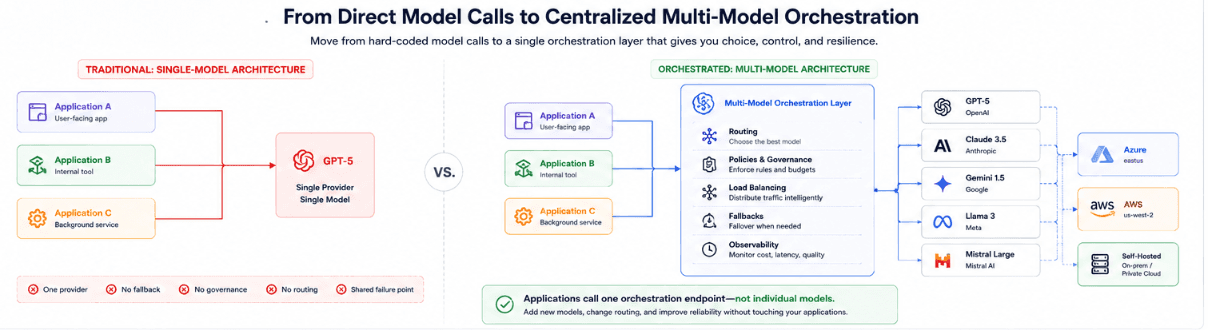
Instead of wiring every service straight to “its” model, you put a single orchestration layer in the middle.
Applications send requests to that layer that knows:
Which models are available (and where)
How they’re grouped into tiers
Which regions and tenants they’re allowed to serve
How to route and fall back between them
The orchestration layer becomes the one place that understands “for this workflow, under these constraints, use this model or set of models.”
In essence, orchestration covers four responsibilities:
Routing: Choosing which model or model tier should handle each request based on task type, complexity, latency target, cost constraints, region, and risk level.
Load balancing: Spreading traffic across multiple instances or providers so you don’t overload a single endpoint or create a new single point of failure.
Policy and governance: Enforcing who can use which models, where data is allowed to go. How budgets, rate limits, and safety rules apply across teams and workflows.
Observability and control: Providing one place to see usage, cost, latency, errors, and quality signals across all models. Also gives you the option to change behavior via config instead of code.
Note the shift is architectural.
Instead of “this feature calls Model X directly,” you “this feature calls an orchestration endpoint, and the orchestration layer decides which model(s) to use.”
That’s what lets you add or swap models and change routing behavior without rewriting your applications.
Why single-model architectures break at scale
A lot of teams we worked with believe single-model setups break for cost reasons. In reality, it’s more related to architectural reasons.
At low traffic, one provider and one flagship model feels safe and simple. You integrate once, the DX is good, and the model can handle almost anything you throw at it.
So what could be the problem with single-model architectures?
When you have more than one serious workflow, you’ll quickly see that you’ve outgrown that assumption. Support, search, summarization, agents, and internal tools all hit the same model, with the same prompts, at the same priority.
We find the failures tends to show up in a few predictable ways:
Cost concentrates on the wrong work
Everything goes through the most expensive path, even when 60-80% of traffic is simple classification or formatting that cheaper models could handle just as well. Over time, a handful of “default” code paths and agents end up consuming a disproportionate chunk of the LLM budget.
You inherit your provider’s risk profile
One provider outage or API change becomes your problem to deal with. There’s no place to define “if this model is slow, rate‑limited, or misbehaving, move this class of traffic somewhere else” without touching every application.
You can’t trade off latency, cost, and quality per workflow
Real-time chat and legal review shouldn’t have the same model or context window. In a single‑model architecture, every workflow inherits the same defaults. You either overpay for speed and depth where you don’t need it, or under‑invest where you do.
Governance becomes an afterthought
With each app calling the model directly, it’s hard to answer basic questions like which team is using which model, which workflows handle sensitive data, or which features are driving spend.
Adding data residency rules, per‑team budgets, or “approved models only” lists becomes a slow cleanup project instead of a configuration change.
Change becomes dangerous
If switching models means editing dozens or services and there’s no shared layer that can roll out a change gradually or per-route, you simply don’t change often. As a result, it’s a lot harder to adopt better/cheaper models or fix quality issues without a risky, big-bang migration.
At a small scale, these issues are tolerable. But when you go to a larger scale with more users and more providers, they turn into surprise bills and stalled upgrades. More than 80% of organizations report no tangible enterprise-level EBIT impact from generative AI despite adoption
Multi‑model orchestration exists to give you a place to manage those trade‑offs centrally instead of fighting them inside each individual integration.
“The first time a provider outage takes down three unrelated features at once, you stop thinking this is an infra problem and realize it’s an architecture problem.” - Sohrab Hosseini, Orq.ai co-founder
Routing in multi-model orchestration
Routing is the part of orchestration that makes the call as to which model should handle which request instead of letting every call hit the same default.
In a multi-model setup, the orchestration layer looks at the request and its metadata. Then, it picks from a set of eligible models. The aim is to send each request to the cheapest, fastest model that still meets the quality requirements of that workflow. It only escalates when there’s a clear reason.

A practical routing setup in orchestration includes:
Workflow‑based defaults: Give each workflow a default route (e.g., support FAQs → cheap/fast tier, everyday chat/RAG → balanced tier, legal/incident/complex agents → frontier tier) so apps call a route name while orchestration picks the actual model.
Context‑ and length‑aware choices: Keep short, document‑free prompts on smaller models, and send long‑context, document‑heavy calls to models that can handle big inputs to avoid paying long‑context prices for simple questions.
Cost/latency policies per route: Mark routes as “optimize for latency,” “optimize for cost,” or “optimize for quality,” and let the router use those policies to choose between eligible models and providers.
Region and policy filters: Filter the model pool first by region, data sensitivity, environment, and allowed providers (e.g., “EU data only on EU-approved endpoints,” “no experimental models in prod”) before making any routing decision.
Fallback‑aware decisions: Define a fallback chain per route (Model A → Model B → maybe a self‑hosted option) that activates on timeouts, rate limits, or quality failures, with every escalation logged.
The main thing to note here is that all of this lives in the orchestration layer and not in individual apps. Applications send a request plus context to a single endpoint. Routing decisions happen centrally so you can change them over time without rewiring every integration.
Load balancing across models and providers
Once you have more than one model or provider added to the equation, orchestration has to decide how to spread traffic and not just where to send it.
At a small scale, load balancing is just picking a single model endpoint and trusting the provider to handle the rest.
At a larger scale involving multiple providers and deployments, you need your own logic. The orchestration layer becomes the place that decides how to distribute requests across equivalent models, avoid hot spots, and keep services responsive even when one provider slows down or hits rate limits.
We notice teams find themselves using a few simple patterns:
Weighted load balancing within a tier
When you have several “equivalent” models in the same tier (for example, two regional deployments of the same model, or two providers with similar price/quality), you assign weights and let the orchestrator spread traffic accordingly. You might start 70/30 between a primary and a backup, then adjust weights as you gain confidence or see performance differences.
Latency‑aware selection
For latency-sensitive workflows, the orchestrator tracks recent response times per model and region. It prefers the fastest healthy option.
If a provider’s p95 latency spikes, traffic can shift to a faster alternative within the same tier until performance stabilizes.
Health‑ and error‑aware routing
Orchestration layers continuously monitor error rates and timeouts. When a model or provider crosses a threshold, it temporarily drains traffic away. This opens a circuit breaker and routes requests to better alternatives.
Once health recovers, it can gradually reintroduce load instead of flipping everything back at once.
Region‑aware balancing
Traffic is often split by geography for both latency and compliance reasons.
The orchestrator chooses the closest eligible deployment for a given user and can rebalance across regions when one becomes saturated or degraded, always within the constraints of your data residency rules.
Canary and rollout balancing
After you introduce a new model or upgrade, the orchestration layer can treat it as another target in the pool and send a small percent of traffic there first. If cost and eval scores look good, you gradually increase its share.
If not, you dial it back without touching the application code.
Managing multiple LLMs: the control panel
After you move past a single model, you don’t just need more integration. You need a place where the whole model layer can be seen and controlled as a system.
Multi‑model orchestration works best when there’s a clear control panel: a layer where you can see which models exist and how traffic flows between them.
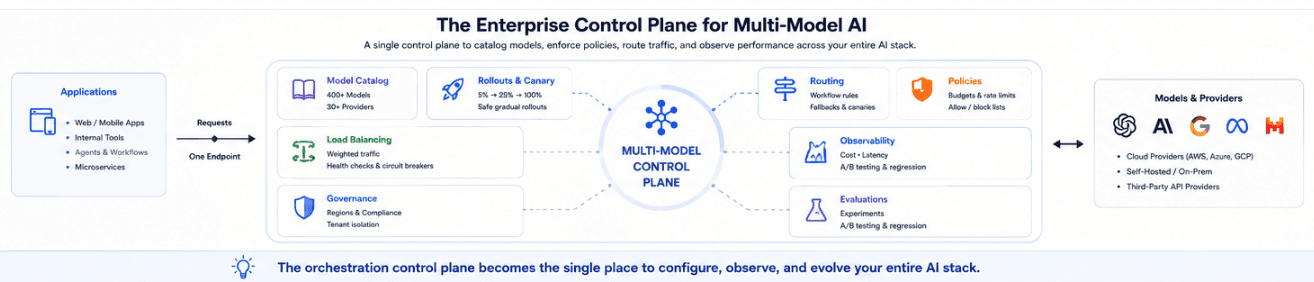
Instead of each team owning its own one‑off wiring to Anthropic or self‑hosted deployments, the control panel becomes the shared surface where platform teams set policies and application teams plug in.
A useful control panel for multiple LLMs usually covers a few things.
Model catalog and ownership: Keep a single catalog of all models and endpoints (provider, tier, cost, region/deployment, and internal owner) so routing/load balancing have a source of truth and security/legal/finance can answer “who uses what, where?”
Policies, budgets, and access control: Define per‑team/project budgets, rate limits, allowed providers, and data‑handling rules in one place. Enforce them whenever any request passes through the orchestration layer instead of scattering checks across codebases.
Routing and rollout configuration: Manage which models each route can use, how traffic is split, what the fallback chain looks like, and how new models are canaried (e.g., 5% → 25% → 100%. Changing behavior then feels like editing config, not redeploying apps.
Observability and quality signals: Centralize usage, cost, latency, error rates, fallback activity, and (ideally) eval scores per route/team/model. This lets you spot issues or cost drift from one control panel instead of chasing logs across many services.
Build vs. buy: should you build your own orchestration layer?
Sometimes we’ve talked to teams that bring up how tempting it is to treat orchestration as just another internal service. In some cases, that might be the right call. But more often than not, it ends up turning into a full platform.
At the small end, a homegrown orchestration layer can be a thin wrapper. A shared service that holds provider keys, exposes a unified API, and does some simple routing and retries.
At the large end, a production orchestration layer needs to act like a control plane: model catalog, routing and load balancing, budgets, policies, observability, eval hooks, prompt management, rollout controls, and ongoing maintenance as models and providers change.
A good way to decide is to look at scope and team capacity rather than only thinking about “can we build this?”
Build your own orchestration layer when:
Your needs are narrow and stable (a few workflows, a few model families, no aggressive multi‑tenant governance).
You have a strong platform team that’s already running shared services and can treat orchestration as part of that stack.
You need very specific deployment or compliance constraints that generic platforms don’t handle well (strict on‑prem, bespoke network topology, deeply custom agent frameworks).
You’re comfortable owning incident response, upgrades, and API churn across all integrated providers.
Adopt a managed orchestration platform when:
Multiple teams and products will rely on the same model layer, and you don’t want each of them reinventing routing and governance.
You need routing, load balancing, caching, budgets, permissions, observability, evals, and prompt management to work together rather than stitching several tools by hand.
Provider choice, pricing, and model lineups change faster than your internal upgrade cycles.
You want the ability to add models, adjust routes, or enforce policies centrally without pushing changes into every codebase.
Ultimately, we find teams end up doing a bit of both. They keep a thin internal edge that fits neatly into their infra and security world, and lean on a dedicated orchestration platform for the heavy lifting inside that boundary.
Common orchestration mistakes to avoid
Even good orchestration ideas can under-deliver if the control layer is put together in a hurry.
Here’s the main patterns to look out for:
1. Treating orchestration as plumbing only
Some teams only think about orchestration as a way to hit multiple APIs from one place. The mistake is ignoring policies and observability. You end up with a central point of failure that still can’t answer “who’s using what, and what is it costing us?”
2. Hard‑coding routing inside applications
If routing logic lives inside each service, you haven’t really built orchestration. You’ve built another SDK. Changes to models, tiers, or providers still require code changes and redeploys across many apps, which entirely defeats the purpose of having a central layer.
3. No per‑route visibility into cost and failures
It’s easy to add complexity to routing and forget the whole thing only works if you can measure quality.
Without task‑specific evals and clear thresholds, you can’t tell whether “smart” routing is helping or actually degrading outputs.
4. Ignoring governance until late
If you only see a single “LLM spend” line and a global error rate, you can’t see which workflows and routes are doing well and which are leaking money or failing.
Mature orchestration exposes cost, fallback rates per model so you can tune behavior where it actually matters.
Orq.ai’s multi‑model orchestration, in practice
Orq.ai gives you the missing middle layer we kept pointing to: one endpoint in front of all your models where routing, fallbacks, and policies live, instead of being hard‑coded into every service. You define routes and tiers per workflow like what models are eligible, which regions and tenants they can serve, and how to fail over.
Because every request is traced with route, model, latency, cost, and fallback events, you can finally see which workflows use which models and where spend and failures concentrate, instead of staring at one opaque LLM bill.
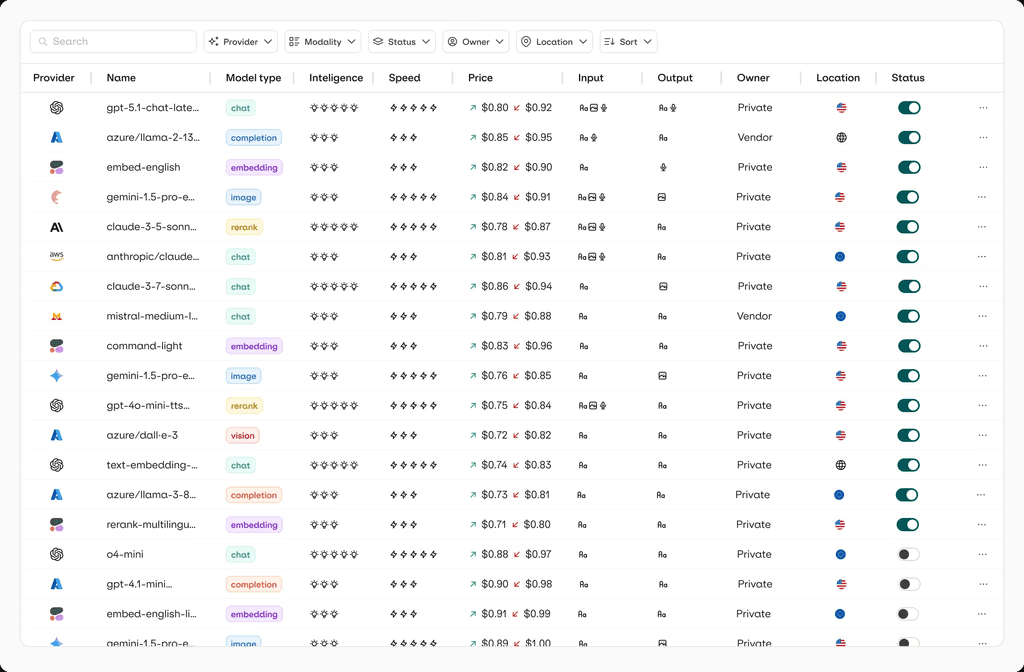
That same control plane is where you add per‑team budgets, “approved models only” lists, and gradual rollouts, so changing models or providers becomes a configuration change instead of a risky refactor.
Make orchestration a design choice, not an emergency fix
When you only have one model and one workflow, wiring apps straight to a provider feels harmless; once you add more workflows, regions, and teams, it quietly turns into a tangle of hard‑coded calls, surprise bills, and fragile migrations. Multi‑model orchestration is how you pull those concerns back into one layer: routes instead of raw endpoints, policies instead of scattered checks, and configuration changes instead of multi‑service refactors.
Ready to move past single‑model wiring? Book a demo to see how Orq.ai’s router turns your model layer into something you can see, configure, and evolve without rewriting your apps.
FAQs
Do I need orchestration if I only use one provider?
Not at the very beginning, when you have a single workflow and a single model, you can often get away with calling the provider directly. Orchestration starts to matter as soon as you care about per‑workflow trade‑offs, governance, or having a clean way to introduce a second model or region without touching every app.
Can I build my own LLM orchestration layer?
Yes, many teams start with a thin internal service that wraps a few providers and adds simple routing or retries. The risk is that it turns into a full control plane involving catalog, routing, budgets, policies, observability, eval hooks. It requires ongoing ownership more like a platform than a small utility.
How does orchestration handle provider outages?
A good orchestration layer treats provider health as a routing signal: when a model or endpoint starts timing out, erroring, or hitting rate limits, traffic automatically shifts to tested fallback routes instead of failing the whole workflow.
Those fallback decisions are logged and monitored so you can see when you’re running on backups and tune the behavior, rather than discovering it only during an incident.
How long does it take to set up multi-model orchestration?
If you already know where your LLM calls live, a minimal orchestration layer involving a unified entrypoint and a few routes can come together in days or weeks, not months. The deeper work is iterative. Adding more routes, tightening governance, and wiring in evals as more teams and workflows start relying on the same control layer.

Sohrab Hosseini
Co-founder (Orq.ai)
About
Sohrab is one of the two co-founders at Orq.ai. Before founding Orq.ai, Sohrab led and grew different SaaS companies as COO/CTO and as a McKinsey associate.