
AI Model Router: How to Route Requests Across LLM Providers in 2026
Learn how a model router for AI directs requests across LLM providers. Routing strategies, architecture, cost savings, and how to set one up in production.

Sohrab Hosseini
Co-founder (Orq.ai)
Key Takeaways
Model routing transforms from a one-time infrastructure decision into a runtime optimization layer.
Cost optimization without quality guardrails is a silent killer.
A model router and AI gateway work best together as complementary layers.
Bring LLM-powered apps from prototype to production
Discover a collaborative platform where teams work side-by-side to deliver LLM apps safely.






Choosing an LLM isn’t a static decision like it once used to be.
Teams used to pick one provider, wire into the application, and send every request to the same model.
That approach won’t cut it anymore, due to how modern production AI systems behave.
A customer support assistant might need a fast model for intent detection and a stronger model for complex account questions. An internal research agent could use one provider for long-context analysis, but go with a different one for structured extraction.
And the list goes on.
As a result, model choice isn’t the only factor you should be thinking about. You should think more along the lines of “what model should handle this specific request under these constraints, at this moment?”
That’s the role of an AI model router.
This guide explains what an AI model router is, how routing architecture works, which routing strategies matter, how to set up a router in production and how to avoid the common mistakes that lead to hidden cost, latency or quality problems.
What is an AI model router?
An AI model router is a decision layer that chooses which model should handle each AI request.
Rather than sending every prompt to the same provider, the application sends the request to the router. The router then evaluates the request against configured rules and forwards it to the model best suited for the job.
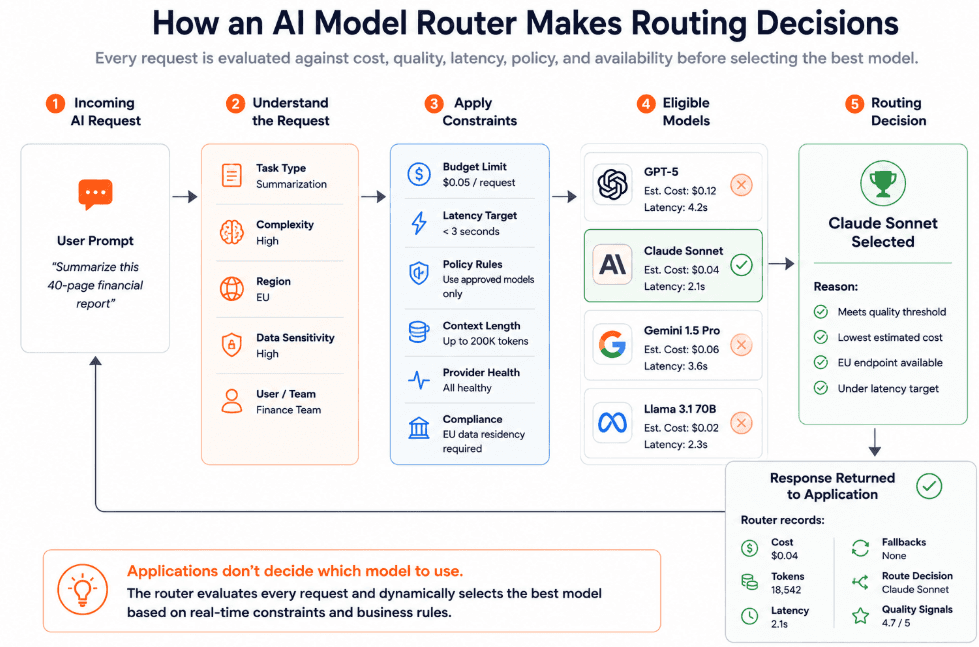
That decision is based on factors like:
Cost
Latency
Task type
Model quality
Provider availability
Region
Data sensitivity
Fallback requirements
Picture this: a router sends simple classification tasks to a lower-cost model. Meanwhile, it sends complex reasoning tasks to a frontier model and keeps EU regional data inside approved regional endpoints.
A model router is especially useful when different requests have different requirements. Not every task needs the strongest model. Not every workflow can tolerate the same latency. Not every prompt should go to every provider. Routing gives teams a way to match each request to the right model.
AI model router vs AI gateway
Even though AI model routers and gateways are related, it’s important to know they solve different aspects of the production AI problem.
A model router focuses on decision-making. It decides which model or provider should handle a request.
An AI gateway focuses on control and standardization. It gives you one managed layer for accessing models, applying policies, and monitoring traffic across providers.
Category | AI model router | AI gateway |
Primary role | Selects the best model or provider for each request. | Centralizes access, governance and observability for AI traffic. |
Main question it answers | “Where should this request go?” | “How should all AI traffic be accessed, controlled and monitored?” |
Scope | Narrower and more decision-focused. | Broader infrastructure layer around model access. |
Typical inputs | Prompt type, task complexity, latency needs, cost limits, region, provider health, quality thresholds and policy rules. | Application identity, API keys, provider credentials, request metadata, user/team ownership, routing rules, policy settings and logging requirements. |
Typical outputs | A selected model, provider, fallback path or route. | A governed request path with access control, logging, routing, budget tracking and policy enforcement. |
Core capabilities | Rule-based routing, semantic routing, fallback routing, load balancing, cost-aware routing and latency-aware routing. | Unified API, credential management, usage tracking, token metering, budget controls, audit logs, guardrails, rate limits, provider abstraction and observability. |
Cost role | Routes eligible requests to cheaper models when quality requirements allow. | Tracks cost across providers, teams, workflows and keys, then enforces budgets or usage limits. |
Reliability role | Sends traffic to backup models when the primary option fails, times out or becomes rate-limited. | Standardizes retries, timeouts, fallback policies and provider access across applications. |
Governance role | Can route sensitive requests only to approved models or regions. | Defines and records policies across users, teams, providers, workflows and audit trails. |
Observability role | Shows why a routing decision happened and how each route performed. | Captures the wider trace: prompt, output, tokens, cost, latency, retries, fallbacks, policy events and ownership metadata. |
Best fit | Teams that already have model access in place but need smarter model selection. | Teams that need centralized control over multi-model usage across production systems. |
Risk if used alone | Routing may improve cost or latency, but governance, budgets, tracing, and access control might be disjointed | Gateway access may be centralized, but model selection can stay static or inefficient without strong routing logic. |
Think of it like this:
An AI gateway is the controlled entrance to your model stack.
An AI model router is the traffic logic that decides which path each request should take.
We find that the two work together in production. The gateway provides the shared access layer while the gateway makes the decision on how the traffic should move through the layer.
For example, an application sends a request to the gateway. The router then selects a model based on cost and quality requirements while the gateway applies policies and logs the trace. Finally, the response returns to the application.
You end up with much more flexibility and control when you combine the two. Using a router means you avoid sending every task to the same expensive model. The gateway gives you peace of mind that your access and monitoring stay consistent across the full AI stack.
Why model routing matters in production AI
In our experience, production AI traffic is often very uneven.
Not every request has the same complexity or latency requirement. You don’t want a one-sentence classification prompt going to the same model as a multi-step reasoning task. Speed might be more a priority than maximum reasoning depth for a real-time chat response.
Without routing, we’ve seen teams fall into one of two patterns.
First pattern is overusing the strongest model. It might sound good on paper because you keep quality high this way. But routine tasks become unnecessarily expensive. Simple extraction and tagging start taking up frontier-model budget when smaller models would be enough.
Second pattern is standardizing on a cheaper model too aggressively. It reduces spend in some cases, but then quality suffers badly when you have tasks that need deeper reasoning or longer context.
Routing gives teams a way out of that trade-off. Instead of choosing one model for everything, they can match model choice to the request.
It also improves resilience. Providers can rate-limit requests or even become unavailable at times. You can shift traffic to another approved model with a router, rather than waiting for one provider to recover.
“We built a router because we were tired of every model change feeling like open‑heart surgery on the product” - Sohrab Hosseini, Orq.ai co-founder
How a model router works
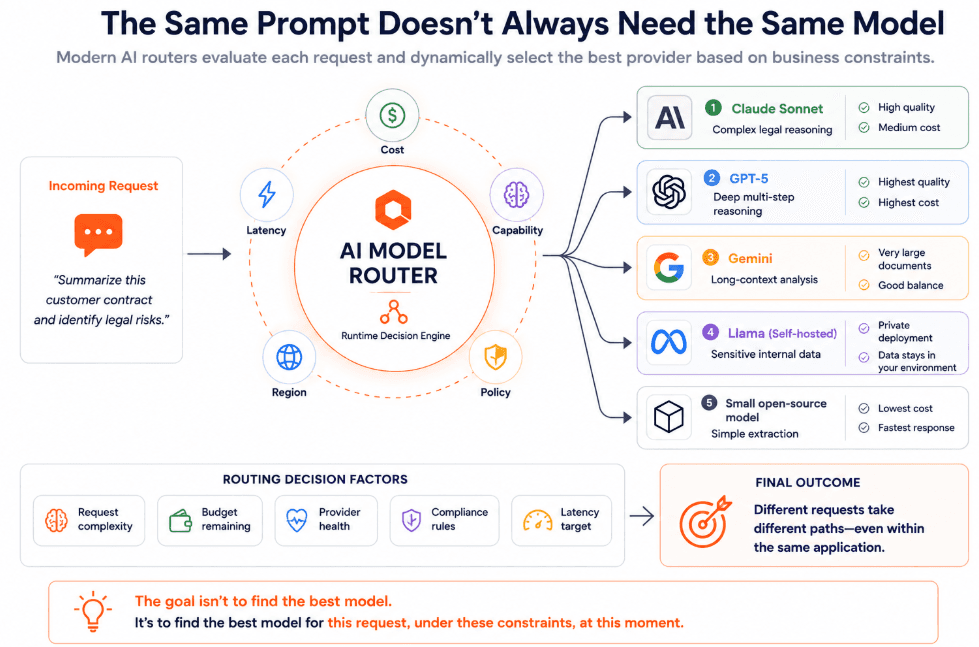
Model routers turn model selection into a runtime decision.
Here’s how it works in a 7-step process:
1. The application sends the request
It starts by the application sending a prompt and metadata to the router.
Metadata can include:
Workflow
User
Team
Project
Environment
Region
Sensitivity level
Task type
That context is important. A customer-facing support request, an internal summarization job and a regulated financial workflow may all need different routing rules.
2. The router identifies the task
Secondly, the router uses explicit labels or classifiers to understand what kind of request it received.
The request might be tagged as either classification, extraction, or code generation.
Some systems rely on application-defined routes whereas more advanced routers inspect the prompt and assign it to a category dynamically.
This step helps avoid treating every request as equal.
3. The router checks constraints
Next, the router checks the conditions that limit where the request can go.
Think along the lines of:
budget limits
Latency requirements
Region
Data policy
Provider availability
Rate limits
Model capability
Context length
Security rules
Quality thresholds
A sensitive request might only be allowed to use approved providers.
A real-time chat request might need a low-latency model.
A long-context task might require a model with a larger context window.
In this step, it boils down to the router narrowing down the eligible model pool before choosing the route.
4. The router selects the model
Once the router understands the task and constraints, it now chooses the model. The decision may follow a fixed rule or a priority list.
Some examples would be:
simple classification → low-cost model
complex reasoning → frontier model
EU customer data → EU-approved endpoint
provider timeout → fallback model
batch summarization → cost-optimized route
high-value workflow → quality-prioritized route
Main point is that the choice happens outside the application. You can adjust routing behavior without rewriting the product itself.
5. The request is sent to the provider
The router forwards the request to the selected model provider while handling provider-specific formatting and authentication.
This helps reduce engineering overhead since applications don’t need to manage each provider’s quirks directly.
6. The router handles retries and fallbacks
In the event that a selected provider fails or times out, the router applies fallback logic.
A fallback might send the request to another model from the same provider or even a self-hosted deployment. We believe the best fallback chains are tested before production. Mainly because backup models still have to meet quality and policy requirements.
Fallbacks should also be visible. A final answer might look successful but the system probably needed two failed attempts before reaching it.
7. The router logs the decision
Lastly, the decision is complete. The router records the route decision and result now.
Some examples of useful logs include:
Selected model
Eligible alternatives
Routing rule
Token usage
Cost
Latency
Retry count
Fallback events
Error code
Quality signals
This is what makes routing manageable in production. You’ll be able to see whether routes behave as expected and whether certain workflows need different rules.
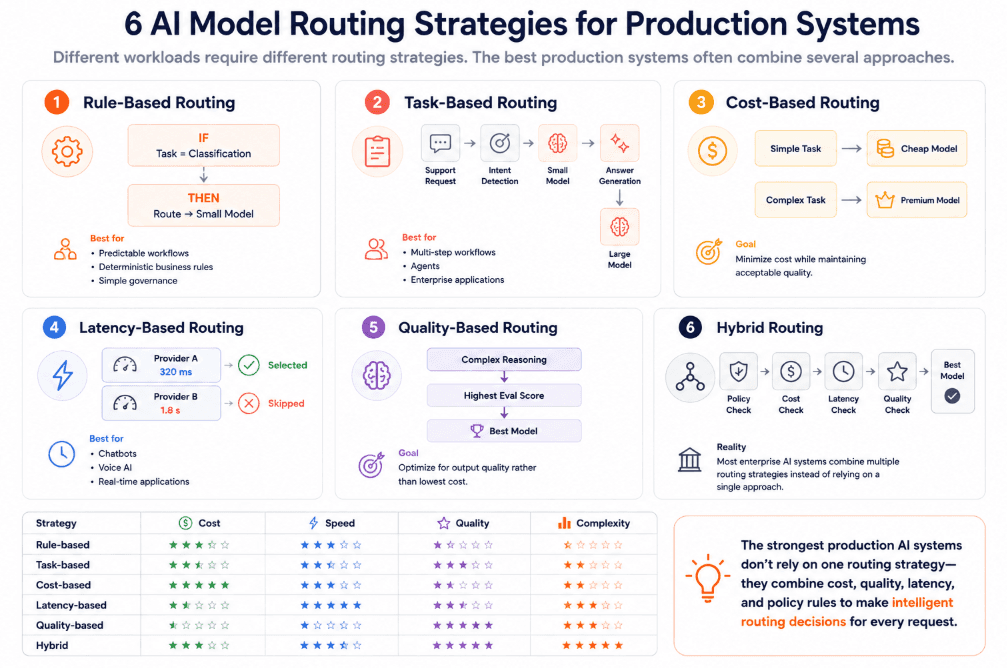
Key routing strategies
Model routing can be simple or sophisticated.
The right strategy depends on the workflow and how much control you need over cost and quality.
1. Rule-based routing
Rule-based routing sends requests to models based on predefined conditions.
A simple example to illustrate this is when classification tasks go to a low-cost model and legal reasoning goes to a stronger model. In our opinion, this is the easiest routing strategy to test and govern.
Works very well when task categories are clear and requirements don’t change constantly.
2. Task-based routing
Task-based routing matches the model to the type of work being done.
A support agent can use one model for intent detection but another for answer generation. On the flip side, research workflows have a high chance of using a long-context model for document analysis and a cheaper model for extracting structured fields.
That way, you avoid using the same expensive model for every step in a workflow.
3. Cost-based routing
Cost-based routing prioritizes cheaper models when the task doesn’t require frontier-level capability.
A big benefit of this approach is it reduces spend drastically, particularly for high-volume tasks like extracting and rewriting. But take into consideration there’s a notable downside in that you can lose quality if the routing rule is too aggressive.
Cost-based routing should always be paired with evals, quality thresholds, and monitoring.
4. Latency-based routing
Latency-based routing sends requests to models or providers that can respond within the required time window.
For workflows like customer support and voice agents where delay affects the experience, it’s something to think about. Batch jobs, back-office processing and offline analysis may tolerate slower responses if the cost is lower.
Good latency routing should look beyond averages and monitor p95 and p99 response times. Google found that reducing p99 latency has a disproportionately large impact on perceived application performance compared with average latency.
5. Quality-based routing
Quality-based routing chooses models based on expected output quality for a specific task.
A stronger reasoning model may handle complex decisions while simpler requests go to smaller models that have already passed evals for that task type. The router can use benchmark results or historical performance to guide the decision.
This is stronger than routing by model reputation alone, since the best model depends on the task.
6. Hybrid routing
Hybrid routing combines multiple routing strategies into a single decision process rather than relying on one rule alone.
For example, a router might first apply policy rules to exclude unapproved providers, then check latency requirements, evaluate cost, and finally choose the highest-quality model from the remaining options. This layered approach gives you more flexibility while balancing governance, performance, and budget.
How to maintain quality while routing
We’ve covered that model routing helps with reducing cost and improving latency. But if you don’t test routing decisions carefully, you can end up with weaker output quality.
The risk is simple. A request can be technically complete but the answer might be less accurate or unsuitable for the workflow.
That’s why you should treat routing as a quality-controlled production change instead of just infrastructure optimization.
Start with task-specific evals
Before moving traffic across models, create eval sets for each major workflow.
A code assistant, RAG workflow, and internal research agent all need different quality checks.
Use real production examples where possible. Include:
Normal cases
Edge cases
Failed outputs
Long prompts
Ambiguous requests
High-value scenarios
Generic benchmark results can help with initial screening but they won’t show whether a model performs well on your actual workflows.
Always think about if your chosen model handles the task well enough under the current constraints.
Define minimum quality thresholds
Routing needs guardrails around acceptable quality.
For each workflow, define the minimum standard a model must meet before it can receive production traffic. This might include:
Factual accuracy
Formatting consistency
Citation quality
Tool-use reliability, Refusal behavior
Tone
JSON validity
Grounding in retrieved context
Escalation behavior
We’ve seen far too many teams end up with routing that’s too cost-driven without routing. A cheaper model looks attractive until it starts failing on the cases that matter most.
Test fallback models before production
Fallback models shouldn’t be treated as emergency guesses.
If a primary model fails, the backup model still needs to produce acceptable answers. Test fallback paths with the same evals used for the primary route. Check whether outputs remain accurate and safe enough for the workflow.
This matters because users usually don’t know a fallback occurred. They only see the final answer. If the backup model produces weaker responses, the system appears reliable while the quality is actually dropping.
Monitor quality after route changes
Pre-launch testing helps. But production behavior can still differ.
After changing a route, you should monitor:
Monitor eval scores
User feedback
Refusal rates
Escalation rates
Correction rates
Hallucination reports
Support tickets
Compare these signals against the previous route. A model switch shouldn’t be judged only by lower cost or faster latency.
Pay close attention to slow degradation because quality issues might not appear as obvious failures. They could show up as more vague answers or weaker reasoning.
Keep prompt versions tied to routes
You should track prompts and routes together.
A prompt that works well on one model can behave differently on another. If you change both the model and the prompt without prompt tracking, debugging becomes a nightmare. No one knows whether the issue came from the route, the prompt, the model or the retrieved context.
A better setup links each trace to the prompt version and workflow. You get a clear path when an output regresses.
How to set up a model router
Setting up a model router starts with understanding what your AI traffic actually looks like.
Remember that you aren’t trying to route everything from day one. You want to try to create a controlled path for model requests and add routing logic where it genuinely improves reliability or latency.
1. Map current model calls
A good place to start is considering where your LLM calls happen today. Applications, agents, and Internal tools.
For each one, capture the:
Model
Prompt type
Average volume
Token usage
Latency
Error rate
Owner
Business purpose
This gives you a good baseline before routing changes anything and highlights early candidates like high-volume tasks and expensive routes.
2. Set goals and tasks groups
Next, decide what each workflow should optimize for.
One route might prioritize cost. Another for low latency. Another for regional processing and approved providers.
Then group tasks by type and risk:
Classification
Extraction
Summarization
Rewriting
Retrieval
Code generation
Long-context analysis
Multi-step reasoning
We find the best place to start is with low-risk, high-volume tasks. Namely because high-risk workflows need stricter testing and more conservative rollout.
3. Pick candidate models and build evals
For each task group, choose a small pool of candidate models instead of having an open-ended menu.
Include the current production model, one or two lower‑cost alternatives, and at least one fallback provider where reliability matters. For sensitive or regional workflows, narrow the pool to approved deployments.
Check each candidate model against the quality bar for that workflow. That could structure and accuracy for extraction, grounding for RAG, or tone and escalation behavior for support.
4. Define routing rules, metadata, and budgets
Now that you know which models are viable, start defining simple routing rules.
Make sure every routed request carries rich metadata so you can attribute cost and behavior later. Add basic budgets and limits by team or customer account early. You don't want growth in usage turning into a surprise LLM bill.
5. Launch, observe, and iterate
Don’t flip over everything at once. Initially, start with one or two workflows. Move from offline evals to shadow traffic. Then send a small percentage of live traffic through the router before broad rollout.
One big mistake we noticed a lot of teams make is that they don’t keep old routes available. You should keep it as a rollback option. More so for regulated or customer-facing flows. Make sure traces capture the full route decision so you don’t end up with black box routing.
Review routes regularly for cost, latency, quality, and fallback rates. Adjust as model prices, capabilities, and your usage patterns change.
Do you actually need a model router?
Not every AI product needs a model router immediately. If your application uses one provider, handles low traffic and doesn’t need fallback logic, direct integration is probably enough for now.
A router becomes more useful when model choice starts affecting cost, reliability, latency, or governance.
You likely need a model router if:
You use multiple LLM providers: Routing gives teams a controlled way to move traffic across OpenAI, Anthropic, Gemini, Mistral, self-hosted models or other providers.
Different tasks need different model strengths: Simple classification, extraction and summarization can often use smaller models, while complex reasoning or agentic workflows may need stronger ones.
LLM spend is rising without clear control: A router can send eligible requests to lower-cost models, enforce budget rules and reduce unnecessary use of expensive models.
You need fallback paths: If a provider times out, hits rate limits or suffers an outage, the router can shift requests to approved backup models.
Latency matters for user experience: Real-time chat, voice agents, and support workflows may need routing based on provider speed, region or p95/p99 latency.
You operate across regions: Traffic may need to route to specific endpoints for data residency, latency or compliance reasons.
To make the decision simple, we believe the practical threshold is when model selection becomes something you find your enterprise discussing often. If engineers are always manually switching models and finance keeps questioning LLM spend, routing is the next step you should take.
Build vs. buy: should you build your own model router?
Building a model router makes sense when you have a narrow routing problem or you need deep control over infrastructure.
Buying or adopting a managed router makes more sense when you need production-grade routing and observability without owning the entire layer.
Basic routers are fairly straightforward to build. You can ship rules like “summarization → Model A,” “reasoning → Model B,” or “timeout → Provider C.” This can be enough for early experiments. But production routers are different because they need rate limits and eval integration as well as ongoing maintenance as models and APIs change.
Build your own router when:
Routing rules are simple and relatively static.
You have strong platform engineering capacity to operate and evolve the layer.
You need strict control over deployment (specific regions, VPCs, or on‑prem).
Requirements are highly specialized in ways off‑the‑shelf tools cannot handle.
You want full ownership of routing logic, data, and logs.
Buy or use a managed router when:
You need to move fast across multiple providers without building a control plane.
You need more than routing: observability, retries, fallbacks, budgets, eval hooks, and per‑team metadata.
Many teams or applications will share the same routing layer.
Keeping up with provider changes would become a full‑time operational burden.
Governance, auditability, and compliance evidence are first‑class requirements.
How Orq.ai supports production-grade AI routing
Orq.ai gives you a central routing layer that speaks an OpenAI‑compatible API, so apps keep their existing client code while routing logic moves into configuration. You define routes per workflow, so switching models or introducing canaries no longer means touching every service.
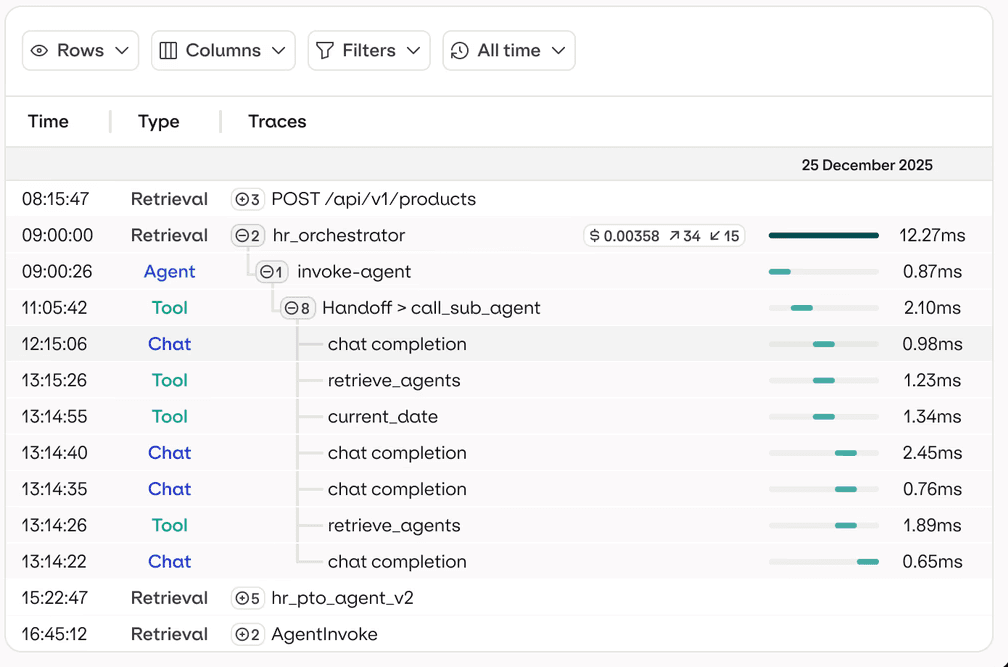
Routing is tied directly to visibility: each call is traced with prompts, outputs, latency, tokens, errors, and fallbacks, all tagged by route and team. That same trace stream can feed evals and experiments, letting you compare “cheap vs strong” or “provider A vs provider B” on real traffic before you shift more requests.
On top of that, Orq.ai adds budgets, rate limits, and model allow lists around the router, so finance, security, and platform teams share one control plane.
Route with control, not guesswork
The real risk in multi‑model AI isn’t picking the “wrong” provider once. It’s letting model choice, cost, and failover evolve ad‑hoc in every app until you can’t see or safely change anything.
A router and control plane give you one place to decide which models handle which work, how they fall back, and what they cost. Upgrades, outages, and pricing changes become configuration updates instead of incidents.
If you’re at the point where engineers are hand‑tuning model choices and finance is asking hard questions about LLM spend, it’s time to put routing on a predictable footing.
Book a demo with us to see how a production‑grade model router and control layer can centralize routing, observability, and budgets across your providers.
FAQs
How much does routing actually save?
Savings depend on:
1. Workload mix
2. Traffic volume
3. Model prices
4. Prompt size
5. How many tasks can safely move to lower-cost models
The biggest gains usually come from routing simple, high-volume tasks away from expensive frontier models while keeping quality thresholds in place.
Will routing hurt output quality?
Routing can hurt quality if you optimize only for cost or latency. To avoid that, each route should be tested with task-specific evals, monitored in production, and rolled out gradually with fallback options.
What's the simplest way to start routing?
Start with one clear use case, like sending simple classification or summarization tasks to a lower-cost model while keeping complex reasoning on your current model.
Add metadata, track cost and quality, then expand routing only after the first route performs reliably.
Can I route across providers and self-hosted models?
Yes. A model router can route across commercial providers, open-source models, and self-hosted deployments if they’re connected through the routing layer.
Useful when you need different models for cost, quality, data residency, privacy or infrastructure-control reasons.

Sohrab Hosseini
Co-founder (Orq.ai)
About
Sohrab is one of the two co-founders at Orq.ai. Before founding Orq.ai, Sohrab led and grew different SaaS companies as COO/CTO and as a McKinsey associate.