
9 Best LLM Observability Tools in 2026 (Open Source & Enterprise)
Compare the 9 best LLM observability tools in 2026 by tracing depth, evaluation features, pricing, and enterprise governance to monitor production AI apps.

Sohrab Hosseini
Co-founder (Orq.ai)
Key Takeaways
Traditional APM tells you if the service ran; LLM observability tells you whether the answer was grounded, the agent used the right tool, and a fallback model quietly changed the output—failures that hide inside successful requests.
Real LLM observability needs three connected layers: tracing (what happened), evals (was it good enough), and cost visibility (what changed)—siloed dashboards leave the operating question unanswered.
The right tool depends on the failure mode you most need to catch
Bring LLM-powered apps from prototype to production
Discover a collaborative platform where teams work side-by-side to deliver LLM apps safely.






Most LLM failures don’t start with a red dashboard.
A customer reports a bad answer. The API logs look normal. The request completed, latency stayed within range, and the model returned a response. From the outside, the application is working.
Then the team opens the trace.
The retrieval step pulled the wrong document. The model answered from that context confidently. A tool call returned a partial result, but the agent kept going. The fallback model handled the request after a timeout, and the output changed just enough that nobody noticed until a user complained.
Traditional APM can tell teams whether a service is slow, unavailable, or returning errors. It usually can’t tell whether the answer was grounded, whether the agent used the right tool, whether a prompt change damaged one workflow, or whether a retry loop quietly pushed up cost.
That gap is exactly why LLM observability has become a core part of production AI. Gartner predicts that by 2028, LLM observability investments will be part of 50% of GenAI deployments, up from 15% today. It also notes that these tools go beyond standard IT metrics such as response time, adding LLM-specific measures such as hallucinations, bias, token usage, drift, cost, and output quality.
This guide compares nine LLM observability tools by tracing depth, evaluation features, cost visibility, deployment model, pricing, and enterprise readiness.
What is LLM observability?
LLM observability is the ability to inspect what happened inside an AI application after a user sends a request.
For a simple chatbot, that might mean seeing the prompt, model response, latency, token usage, cost, and final output. For a RAG workflow, it also means seeing the retrieved context and whether the answer was grounded in it. For an agent, it means seeing the steps before the final answer: tool calls, retries, fallbacks, intermediate decisions, and where the process slowed down or went off track.
image
Put simply, LLM observability lets teams answer three key questions:
What happened?
Was the output good enough?
What changed when quality, cost, or latency moved?
Without that visibility, teams are left piecing together the story from application logs, user complaints, and model bills. With it, they can debug failures, compare prompt or model changes, monitor quality in production, and turn real incidents into better tests.
LLM observability vs traditional APM
APM is still useful. It just doesn’t see the whole AI problem.
If a service goes down, latency spikes, or an API starts returning 500s, traditional monitoring is usually the right place to start. The team can follow the request, check logs, inspect infrastructure metrics, and find the component that failed.
But many LLM issues don’t show up that cleanly.
A support agent can return a fluent answer using the wrong policy document. A RAG workflow can retrieve the right file but miss the paragraph that mattered. An agent can call the right tool with the wrong argument. A retry loop can quietly double the cost of a workflow without causing an outage.
From the application’s point of view, the request may have succeeded.
That’s where APM and LLM observability separate. APM tells teams whether the software path ran. LLM observability helps teams inspect whether the AI path made sense.
image
The failure may sit inside the answer, not inside the infrastructure.
The two should work together. A slow model call still affects performance. A failed tool request still belongs in the trace. But for LLM apps, “healthy” can’t only mean available and fast. It also has to mean grounded, useful, safe, and financially sustainable.
“In production AI, uptime is only part of the story. The harder question is whether the system gave the right answer, used the right context, followed the right policy, and did all of that at a cost the business can explain. That’s why LLM observability has to look beyond infrastructure health.” - Sohrab Hosseini, Orq.ai co-founder
Tracing, evals, and cost: the three layers of LLM observability
When something goes wrong in a production LLM app, teams usually don’t start with a clean framework. They start with a question.
Why did this answer look right but use the wrong source?
image
1. Tracing shows what happened
The first place to look is the trace.
A trace shows what happened between the user request and the final output: the original prompt, retrieved documents, model calls, tool calls, retries, fallbacks, latency, errors, and final response.
For agents, this matters even more. The answer the user sees may be the last step in a much longer chain. The trace might show that the model didn’t invent the answer from nowhere. It answered from bad context. Or the retrieval step worked, but a tool call failed later. Or the fallback model handled the request after a timeout and produced a slightly different answer.
This is the first layer: what happened.
2. Evals show whether the output was good
The next question is harder: was the answer good enough?
A trace can show the path, but it can’t always judge the result. That’s where evaluations come in. Evals give teams a repeatable way to test whether outputs are accurate, grounded, safe, relevant, complete, and formatted correctly.
This matters before release, when teams are testing a prompt change, model swap, retrieval update, or agent workflow. It matters after release too, because production behavior changes. User questions shift. Documents go stale. Providers update models. A workflow that passed last month may start failing quietly.
The strongest setups connect evals back to traces. A failed eval should not just leave a score in a dashboard. It should point the team back to the step that caused the failure. A bad production trace should become a future test case.
3. Cost visibility shows what changed
Then comes the third question: what did this path cost?
LLM spend often moves in small ways before it becomes obvious. A prompt gets longer. Retrieval adds more context. A fallback fires more often. An agent takes three extra steps. A model swap pushes one workflow onto a more expensive route.
A monthly bill usually arrives too late to explain that. Cost visibility needs to show which model, workflow, user, customer, prompt version, route, or agent step created the spend.
This is where observability becomes operational. A higher-cost path may be worth it if quality improved for a high-risk answer. It’s harder to defend if the extra cost came from a retry loop, a fallback route nobody was monitoring, or an agent repeatedly calling tools without improving the result.
How we evaluated these LLM observability tools
We didn’t rank these tools by how many dashboards they have.
We looked for tools that help teams understand the request path, judge output quality, trace cost, and decide what to change next.
We focused on eight core areas:
Tracing depth: Whether each tool captures retrieval steps, tool calls, retries, fallbacks, latency, errors, intermediate agent steps, and the final output.
Evaluation features: Whether teams can run offline evals, production evals, LLM-as-a-judge checks, human review, regression tests, and dataset-based scoring.
Cost visibility: Whether teams can trace spend back to models, users, workflows, customers, prompt versions, routes, or agent steps.
RAG and agent support: Whether each tool can inspect retrieval quality, tool use, memory, multi-step reasoning, and agent behavior before the final answer.
Prompt and dataset workflows: Whether production traces can become eval datasets, whether prompts can be versioned, and whether teams can compare prompt, model, or workflow changes.
Deployment model: How each tool fits into existing infrastructure.
Enterprise readiness: RBAC, SSO, audit logs, retention controls, private deployment options, and team-level administration.
Ecosystem fit: Some tools are best as standalone observability products. Some are eval-first. Some extend APM. Some behave more like gateway monitors. Others fit into a broader GenAI platform. We treated that fit as part of the evaluation, not an afterthought.
There’s no universal winner here. A small team debugging its first RAG app may care most about open-source tracing. A team already deep in Datadog may want LLM telemetry inside the same monitoring workflow. A production AI team managing prompts, evals, routing, and governance may need observability tied to the rest of the AI lifecycle.
Best LLM observability tools at a glance: comparison table
The best LLM observability tool depends on what your team needs to monitor and what you need to do after something changes. Some tools focus on open-source tracing but others are stronger for evaluations, gateway-style logging, or enterprise APM integration.
Treat this table as a starting point instead of a final buying decision. Pricing, self-hosting options, and enterprise features can change, so your team should confirm plan details before selecting a tool.
Tool | Best for | Open source? | Eval strength | Deployment options | Pricing model | Standout feature |
Orq.ai | Production AI teams that want observability, routing, evals, prompts, guardrails, and governance in one platform | No | Online + offline evals | Managed platform, with enterprise deployment options | Free tier + Production / Enterprise plans | Turns traces into evals, routing decisions, guardrails, and deployment workflows |
Langfuse | Teams that want open-source LLM observability with tracing, prompt management, evals, datasets, and cost tracking | Yes | Evals + datasets | Cloud or self-hosted | Open source + paid cloud / enterprise plans | Open-source tracing with prompts, datasets, evals, cost tracking, and self-hosting |
LangSmith | Teams building LLM apps, chains, or agents with LangChain or LangGraph | No | Strong LangChain / LangGraph evals | Managed, with enterprise options | Free + paid usage-based plans | Native tracing, datasets, evals, and experiments for the LangChain ecosystem |
Helicone | Teams that want gateway-style request logging, cost tracking, and lightweight traffic controls | Yes | Prompt experiments / evaluators | Cloud or self-hosted | Free tier + paid plans | Gateway-style request logging with cost tracking, routing, and fallback visibility |
Arize Phoenix | Teams that want open-source tracing and evaluation for RAG systems, agents, and LLM apps | Yes | RAG + response evals | Open source / self-hosted, with Arize AX managed options | Open source + Arize paid plans | Open-source RAG and agent debugging with traces, evals, datasets, and experiments |
Datadog LLM Observability | Enterprises that already use Datadog for APM, logs, infrastructure, dashboards, and alerts | No | Quality / safety evals | Managed | Datadog usage-based pricing | LLM traces and cost signals inside existing APM, logs, dashboards, and alerts |
Confident AI / DeepEval | Teams that care most about evals, regression testing, and CI-style quality checks | DeepEval: yes | Very strong / eval-first | Open-source framework + hosted platform | Open-source framework + paid hosted platform | Pytest-like LLM evaluation framework with hosted quality workflows |
Braintrust | Product and engineering teams comparing prompts, models, scorers, datasets, and production traces | No | Very strong / experiment-first | Managed | Free tier + paid plans | Experiment workspace for comparing prompts, models, scorers, and datasets |
OpenLLMetry / Traceloop | Engineering teams that want OpenTelemetry-native LLM tracing inside their existing observability stack | Yes | Limited / platform-dependent | Open-source instrumentation + hosted option | OpenLLMetry free + Traceloop paid options | OpenTelemetry-native LLM instrumentation for existing observability stacks |
1. Orq.ai
Orq.ai makes the most sense when LLM observability needs to connect to the work that comes after debugging.
A trace is useful, but it’s rarely the end of the job. If a production answer is weak, the team may need to turn that trace into an eval case. If a prompt update causes a regression, the next step may be a prompt fix, dataset update, or deployment decision. If cost jumps, the team may need to look at model choice, fallback behavior, routing rules, or usage by workflow.
Orq.ai is different from a narrower tracing tool. It treats observability as part of the AI lifecycle: monitor what happened, evaluate whether it was acceptable, then update the prompt, route, guardrail, dataset, or deployment behind it.
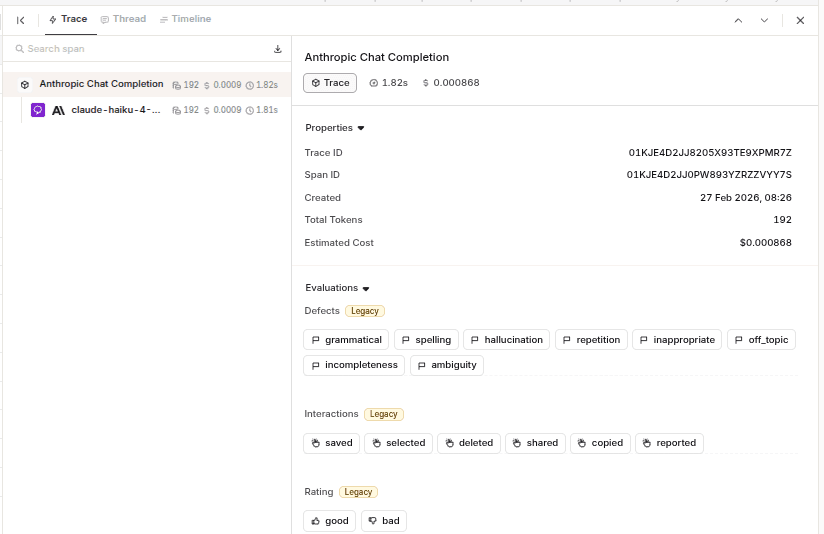
Orq.ai’s trace view helps developers inspect model calls, latency, token usage, estimated cost, evaluation labels, and user feedback signals from one workflow.
Best for
Enterprises that want observability connected to evaluations, routing, prompt workflows, guardrails, deployments, and governance.
Why teams choose it
Teams choose Orq.ai when tracing alone isn’t enough.
The platform is designed for the messy middle of production AI: multiple models, changing prompts, evaluation datasets, fallback paths, guardrails, and release workflows. Instead of leaving traces in one dashboard and quality checks somewhere else, Orq.ai connects observability to the systems enterprises use to improve the application.
That makes it especially useful when different people own different parts of the AI workflow.
Engineering may care about traces and latency. Product may care about answer quality. Operations may care about cost and fallback behavior. Compliance may care about guardrails, access, and auditability. Orq.ai brings those signals closer together.
What it does well
Turns production traces into next actions: A trace can become an eval case, a prompt change, a guardrail update, a routing adjustment, or a deployment check.
Connects observability with routing and gateway controls: Enterprises can review model behavior, cost, fallback behavior, and routing decisions together instead of treating them as separate problems.
Fits enterprise operating requirements: Orq.ai supports SOC 2 Type II, GDPR compliance, EU AI Act alignment, and deployment options such as self-hosted, VPC, or hybrid setups.
Where teams may hit limits
Small prototypes may not need this much platform: If a team only needs basic traces for one early RAG app, Langfuse, Phoenix, or OpenLLMetry may be enough.
Not open-source-first: Enterprises that want to run and modify the entire observability stack themselves may prefer an open-source option.
Pricing
Orq.ai offers a free Developer plan with 50k spans per month. It includes observability, online and offline evaluations, AI gateway, deployments, prompt engineering, experimentation, agent runtime, and knowledge bases.
2. Langfuse
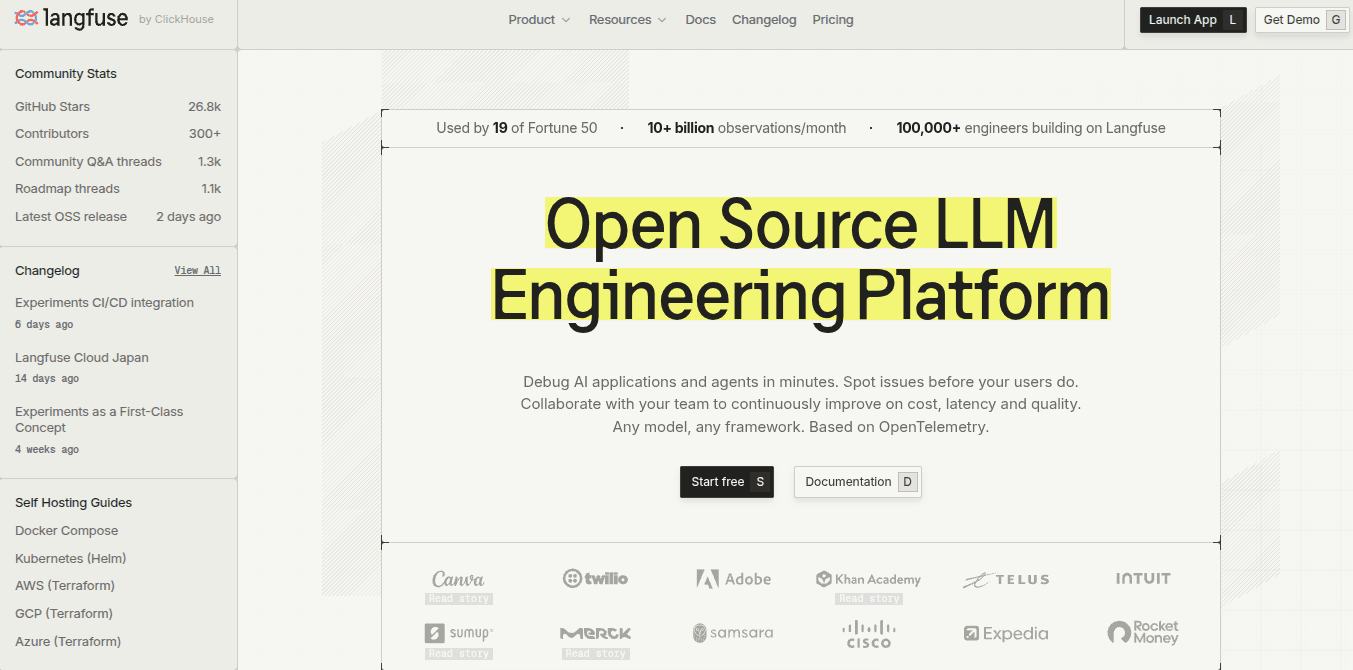
Langfuse is one of the strongest choices when the team wants LLM observability without giving up control of the underlying stack.
Its main appeal isn’t just that it has traces, evals, prompt management, datasets, cost tracking, and dashboards.
A lot of tools now cover parts of that list. Langfuse stands out because it gives engineers a serious open-source path: they can self-host the core platform, keep observability data closer to their own infrastructure, and still get a broad LLM engineering workflow rather than a narrow tracing tool.
Best for
Enterprises that want open-source LLM observability with tracing, prompt management, evaluations, datasets, cost tracking, and the option to self-host.
Why teams choose it
Langfuse tends to appeal to enterprises that want visibility and control in the same package.
A team can start by instrumenting an app, inspecting traces, and tracking cost or latency. Over time, the same setup can support prompt versioning, eval datasets, experiments, and human review.
The self-hosting angle matters. Some enterprises don’t want production prompts, user inputs, retrieved context, or model outputs living only in a third-party SaaS tool. Langfuse gives them a way to run the observability layer themselves, using Docker, Kubernetes, VMs, or enterprise self-hosted options.
What it does well
Open-source observability with real product depth: Langfuse covers LLM and agent tracing, session and user tracking, token and cost tracking, prompt management, datasets, evaluations, experiments, and human annotation.
Evaluation and dataset workflows: Langfuse runs evaluators on production data or during experiments, and supports LLM-as-judge, heuristic functions, and human review workflows.
Good developer ergonomics: Python and JS/TS SDKs are first-class, while other languages can use OpenTelemetry. Langfuse also supports native integrations, proxy-based logging through LiteLLM, and custom API ingestion.
Where teams may hit limits
Self-hosting isn’t “free” operationally: Running Langfuse yourself means someone owns deployment, scaling, upgrades, storage, security, backups, and uptime.
Enterprise controls can sit behind paid tiers or add-ons: Langfuse lists features such as SSO, SSO enforcement, fine-grained RBAC, dedicated support, audit logs, SCIM, SLAs, and longer retention across higher plans or enterprise options.
Pricing
Langfuse offers a free open-source self-hosted option with core platform features. Langfuse Cloud includes paid plans such as Core, Pro, and Enterprise.
3. LangSmith
LangSmith is the obvious place to start if your LLM app is already built with LangChain or LangGraph.
Its biggest advantage is proximity to the application framework. For LangChain and LangGraph users, traces are not an afterthought bolted onto the side of the stack. They fit into the way chains, agents, tools, prompts, and intermediate runs are already structured.
That makes LangSmith especially useful for debugging multi-step applications. If an agent takes the wrong branch, calls the wrong tool, or produces a weak final answer, the trace can show the intermediate steps that led there.
Best for
Building LLM apps, chains, or agents with LangChain, LangGraph, or the broader LangChain ecosystem.
Why teams choose it
LangSmith tends to make the most sense when the development workflow already runs through LangChain.
The setup feels natural for those teams because the objects they care about (chains, runs, tools, prompts, datasets, and evaluators) map closely to how LangSmith organizes the application. Instead of only seeing a final prompt and response, you can inspect the steps between input and output.
It’s useful when the issue isn’t “the model was bad,” but something more specific: the chain passed the wrong variable, a tool returned an unexpected result, the prompt version changed behavior, or the agent made a poor decision halfway through the run.
What it does well
Fits naturally with LangChain and LangGraph: LangSmith’s strongest advantage is its ecosystem fit. Enterprises using LangChain or LangGraph can trace chains, agents, tools, and intermediate runs with less friction than they might have with a more general-purpose tool.
Shows the steps behind agent behavior: LangSmith traces help inspect model calls, tool calls, chain steps, and other intermediate runs.
Supports evaluation and experiments: Build datasets, define evaluators, run experiments, and compare results across prompt, model, or application versions.
Where teams may hit limits
The best experience is still LangChain-native: LangSmith can be used outside LangChain, but its strongest fit is clearly with LangChain and LangGraph applications.
Not a full AI operations platform: LangSmith is strong for tracing, datasets, evals, and experiments. Enterprises that need observability connected to routing, gateway controls, governance, policy enforcement, or broader GenAI lifecycle management may need additional tooling.
Pricing
LangSmith offers a Developer plan and paid plans. The Plus plan is listed at $39 per seat per month, with up to 10k base traces per month included before pay-as-you-go usage. Enterprise options are available for larger enterprises with more advanced requirements.
4. Helicone
Helicone is strongest when the first problem isn’t deep eval infrastructure, but basic visibility into LLM traffic.
We’ve seen a lot of teams reach this point before they have a formal observability strategy. They have requests going to OpenAI, Anthropic, Gemini, or another provider. They want to know what was sent, what came back, how long it took, what it cost, and which user or workflow created the traffic.
That’s where Helicone fits. It’s an open-source LLM observability platform with AI gateway capabilities, built around request logging, cost tracking, provider access, routing, fallbacks, and production traffic visibility.
Best for
Enterprises that want open-source, gateway-style LLM observability: request logs, cost tracking, user-level visibility, routing, fallbacks, and provider access without a heavy setup.
Why teams choose it
Helicone’s appeal is speed of adoption. Instead of starting with a large tracing architecture, you can route or log LLM requests through Helicone and quickly see prompts, responses, latency, usage, errors, and cost. That makes it useful when the immediate problem is, “We have LLM traffic in production, but we do not have a clean record of what is happening.”
It’s also a good fit for teams that think of observability and gateway controls as connected. Helicone isn’t only a trace viewer. It has gateway features for model access, intelligent routing, and automatic fallbacks, so you can inspect traffic and start controlling how it moves across providers.
What it does well
Request logging with low setup friction: Useful when you want to start recording LLM requests quickly.
Cost and usage tracking: Helicone is strong for teams trying to understand spend at the request level. It helps connect token usage and cost back to models, providers, users, and workflows, which is often the first observability gap enterprises notice after launch.
Gateway-style control: Helicone’s AI gateway supports unified model access, routing, and fallbacks.
Where teams may hit limits
Gateway-observability first and not full lifecycle-first: Helicone is strong when the main pain is request visibility, cost tracking, and traffic control. Enterprises that need deeper release workflows, governance processes, deployment management, or a full GenAI lifecycle platform may need additional tooling.
Evaluation depth may not be enough for eval-heavy teams: Helicone has prompt experiments and evaluator support, but enterprises that want large regression suites, CI-style LLM tests, or detailed quality scoring may prefer eval-first tools like Confident AI / DeepEval or Braintrust.
Pricing
Helicone offers a free tier and paid plans for enterprises that need more usage, retention, collaboration, and production features.
5. Arize Phoenix
Arize Phoenix is a good fit when you want to get close to the AI system itself: the retrieval step, the tool call, the model response, the eval result, and the experiment that comes next.
It has a different feel from gateway-style tools like Helicone or ecosystem-specific tools like LangSmith. Phoenix is more of an open-source workbench for tracing, evaluating, and improving LLM apps, RAG pipelines, and agents.
It’s useful when you want to inspect why a response failed, build datasets from those examples, and test whether a prompt, model, or retrieval change actually improved the result.
Best for
Teams that want open-source tracing, evaluation, and experimentation for RAG systems, agents, and LLM applications.
Why teams choose it
Phoenix tends to appeal to enterprises that want to debug AI behavior close to where the work is happening.
A RAG answer may fail because the wrong document was retrieved, because the right document was retrieved but summarized badly, or because the final answer ignored the useful context. An agent may fail because it called the wrong tool, passed the wrong argument, or took too many steps before reaching the user-facing answer.
What it does well
Debugs RAG and agent behavior: Phoenix is strong when the failure is inside the AI workflow rather than the application shell.
Works well for experimentation: Phoenix is useful before production as well as after. You can use it locally, self-host it, or use it while iterating on prompts, retrieval behavior, and agent workflows.
Gives a path to Arize AX: Enterprises that outgrow open-source Phoenix can move toward Arize AX for managed infrastructure, production monitoring, and enterprise options.
Where teams may hit limits
Self-hosting still needs ownership: Phoenix gives teams control, but someone still needs to manage deployment, storage, upgrades, scaling, and security if it’s run internally.
Enterprise features may require Arize AX: Teams that need managed infrastructure, longer retention, enterprise support, compliance features, or advanced deployment options should check which capabilities sit in Phoenix and which require AX.
Pricing
Phoenix is open source and can be self-hosted. Arize also offers AX plans. Its pricing page lists AX Free with 25k included span traces per month and 1 GB included storage, AX Pro with 50k included span traces per month and 100 GB included storage.
6. Datadog LLM Observability

Datadog LLM Observability makes the most sense when LLM monitoring needs to sit next to the rest of production monitoring.
This is different from tools that start from prompt engineering, eval datasets, or open-source tracing. Datadog’s advantage is that many engineering and platform teams already use it to monitor services, infrastructure, logs, incidents, deployments, and application performance.
Datadog LLM Observability is built for that environment. It represents each LLM application request as a trace and helps teams monitor, troubleshoot, and evaluate LLM-powered applications.
Best for
Enterprises that already use Datadog and want LLM traces, cost, quality signals, and production monitoring connected to their existing APM, logs, infrastructure, dashboards, and alerting workflows.
Why teams choose it
Datadog is usually the practical choice when the AI application is just one part of a larger production system.
A poor LLM response may be connected to a slow retrieval service, a failed tool call, a model latency spike, a deployment change, or an upstream API issue. If the team already investigates incidents in Datadog, keeping LLM traces there can reduce context switching.
This is the main appeal. Teams can inspect LLM behavior alongside the systems around it, rather than moving between a separate AI dashboard, an APM tool, logs, and infrastructure metrics.
What it does well
Connects LLM traces to production monitoring: Datadog is strongest when teams want LLM behavior in the same place as application traces, service health, logs, infrastructure metrics, dashboards, and alerts.
Traces LLM and agent workflows: Datadog can represent each LLM application request as a trace, helping teams inspect prompts, model responses, retrieval steps, tool calls, latency, errors, token usage, and cost.
Tracks cost and token usage: Datadog provides LLM cost metrics, including automatically calculated or manually provided cost values, with source tags to show where the value came from.
Where teams may hit limits
Best for Datadog-native teams: If your team does not already use Datadog, adopting it only for LLM observability may be heavier than necessary.
Not mainly a GenAI lifecycle platform: Datadog is strong for traces, monitoring, cost, experiments, evaluations, and APM correlation. Teams that need observability tightly connected to routing, prompt release workflows, guardrails, governance, and deployment controls may still need a broader GenAI platform.
Pricing
Datadog has a free LLM Observability tier with up to 40K LLM spans per month. Its Pro plan is listed from $160 per month and includes 100K LLM spans, with additional on-demand usage after the included span volume.
7. Confident AI / DeepEval
Confident AI / DeepEval is the best fit when evaluation is the center of the workflow, not an add-on to tracing.
DeepEval is the open-source framework underneath it. Think of it as a testing framework for LLM apps: closer to Pytest than to a traditional monitoring dashboard. Confident AI then adds the hosted layer around that framework: collaboration, datasets, tracing, monitoring, dashboards, and team workflows.
That makes this pairing useful when a team has moved past “let’s inspect a few outputs manually” and wants a repeatable way to test answer quality, hallucination risk, task completion, RAG behavior, safety, tool use, or conversation quality before changes reach users.
Best for
Teams that want LLM evaluation, regression testing, and quality monitoring built into development and CI workflows.
Why teams choose it
DeepEval appeals to teams that want LLM quality to look more like software testing.
Instead of reviewing a few examples by hand after every prompt change, teams can write tests, run metrics, and catch regressions earlier. That matters when prompt edits, model swaps, retrieval updates, or agent changes keep creating small behavior shifts that are hard to judge manually.
Confident AI is the layer for teams that want to scale those eval workflows beyond a local framework.
What it does well
Treats LLM quality as a testable engineering problem: DeepEval is useful when teams want repeatable checks rather than informal output review.
Strong metric coverage: DeepEval lists 50+ plug-and-play metrics for AI agents, RAG, chatbots, multimodal systems, safety, tool use, and conversational evaluation.
Custom LLM-as-judge criteria: G-Eval lets teams define custom evaluation criteria using LLM-as-a-judge.
Where teams may hit limits
Evaluation-first, not lifecycle-first: Confident AI / DeepEval is strongest when the main priority is testing and measuring output quality.
Tracing is tied to the eval workflow: Teams looking mainly for APM-style observability, infrastructure correlation, or OpenTelemetry-native telemetry may find Datadog or OpenLLMetry / Traceloop a cleaner fit.
Pricing
DeepEval is open source. Confident AI offers a hosted platform with a free tier and paid plans.
8. Braintrust
Braintrust is best understood as an evaluation and experimentation workspace for AI product teams.
It’s not the first tool we would describe as a gateway monitor, an APM extension, or an open-source tracing stack. Its center of gravity is different: datasets, experiments, scorers, prompt/model comparisons, playgrounds, and production traces that feed back into quality work.
That makes Braintrust useful when a team is past the “can we see the request?” stage and is now asking whether a change actually made the product better. Did the new prompt improve answer quality? Did the model swap reduce cost without hurting task success? Did the examples from production reveal a failure case the test set missed?
Best for
Product and engineering teams that want a structured workflow for evals, experiments, datasets, prompt/model comparisons, and production monitoring.
Why teams choose it
Braintrust is attractive when AI quality has become a release problem.
A team can use production traces to find weak outputs, turn those examples into datasets, define scorers, and compare prompt or model changes against the same cases. Different from reviewing a few examples in a spreadsheet or relying on one-off manual checks before launch.
What it does well
Strong experiment workflow: Braintrust is built around comparing prompts, models, scorers, datasets, and application versions.
Production traces can feed evals: Its core positioning is about turning production traces into evals. That matters because real user traffic often exposes edge cases that internal test sets miss.
Playgrounds for faster iteration: Braintrust’s playgrounds let teams test prompts, models, scorers, and datasets in a no-code workspace, run evaluations in real time, and compare outputs side by side.
Where teams may hit limits
Not a gateway or routing layer: Braintrust is strong for evals, experiments, traces, and quality workflows. Teams that need model routing, gateway controls, fallback policies, guardrails, or runtime policy enforcement may need another platform alongside it.
Not open source: Teams that want an open-source or self-host-first observability layer may prefer Langfuse, Arize Phoenix, Helicone, or OpenLLMetry.
Pricing
Braintrust lists a free Starter plan with 1 GB processed data, 10k scores, 14-day retention, and unlimited users, projects, datasets, playgrounds, and experiments.
9. OpenLLMetry / Traceloop
OpenLLMetry / Traceloop is less about adding another LLM dashboard and more about keeping LLM telemetry portable.
OpenLLMetry is a set of open-source extensions built on top of OpenTelemetry. The point is portability: instrument LLM calls, vector database activity, framework steps, and related spans, then send that telemetry to Traceloop or to the observability backend the team already uses.
That makes it especially appealing for teams that already run OpenTelemetry collectors, traces, and dashboards across the rest of their application stack. Instead of adopting a completely separate LLM observability workflow, they can bring prompts, model calls, vector database operations, and framework traces into the same telemetry pipeline.
Best for
Engineering teams that want OpenTelemetry-native LLM tracing, especially if they already use Datadog, Honeycomb, Grafana, New Relic, or another OpenTelemetry-compatible backend.
Why teams choose it
OpenLLMetry tends to appeal to teams that care about instrumentation ownership.
A team may already have Datadog for APM, Honeycomb for high-cardinality debugging, Grafana for dashboards, or another backend built around OpenTelemetry. In that environment, LLM observability is less about adding one more dashboard and more about making LLM calls show up as part of the same request story.
The practical benefit is that the team can keep its existing operational habits. Model calls, vector database requests, framework spans, and app traces can travel through familiar OpenTelemetry pipelines.
What it does well
Keeps LLM telemetry portable: OpenLLMetry builds on OpenTelemetry, so teams are not forced to keep LLM traces inside one vendor-specific dashboard. They can export telemetry into tools they already use.
Fits existing observability pipelines: Teams that already use collectors, exporters, spans, and traces can treat LLM calls as another part of the distributed trace rather than a separate monitoring category.
Supports common LLM frameworks and providers: OpenLLMetry includes SDKs and instrumentation for LLM applications. Its repositories include the main Python project, plus sister projects such as OpenLLMetry JS, Go, and Ruby, which helps teams instrument across different application stacks.
Where teams may hit limits
Instrumentation-first: OpenLLMetry is strongest at capturing and exporting telemetry.
Evals may require Traceloop or separate tooling: The open-source layer is mainly about instrumentation and telemetry.
Pricing
OpenLLMetry is Apache 2.0 licensed and free to use. Teams can connect it to supported observability platforms, including Traceloop.
How to Choose the Right LLM Observability Tool
Most teams should not start by comparing feature lists.
The better starting point is the failure mode. What would be painful if nobody caught it early? A hallucinated answer? Bad retrieval? A runaway agent loop? A model bill that jumps without explanation? A prompt update that quietly makes one workflow worse?
Those risks point to different tools.
image
For a small RAG team, the first requirement is usually visibility into the request path: what was retrieved, what the model saw, and why the answer looked plausible but used the wrong source. Open-source tools like Langfuse and Arize Phoenix are strong here, especially when the team wants control over data and deployment. LangSmith is the more natural option when the app is already built with LangChain or LangGraph.
If the hard part is quality testing, look more closely at Confident AI / DeepEval and Braintrust. They are not just trace viewers. They are built around evals, datasets, scorers, experiments, regression checks, and release decisions. That matters when teams need to prove that a prompt, model, or retrieval change actually improved the product instead of just changing the output.
Orq.ai fits when observability needs to connect to the work that comes after diagnosis. A bad trace may need to become an eval case. A cost spike may need a routing change. A repeated failure may need a guardrail. A prompt regression may need to block a deployment.
A practical shortlist could look like this:
For open-source tracing and self-hosting: Langfuse or Arize Phoenix.
For LangChain / LangGraph apps: LangSmith.
For gateway-style request logging: Helicone.
For existing Datadog users: Datadog LLM Observability.
For eval-heavy teams: Confident AI / DeepEval or Braintrust.
For OpenTelemetry-native teams: OpenLLMetry / Traceloop.
For production teams that need observability tied to evals, routing, guardrails, prompts, and governance: Orq.ai.
The best choice isn’t the tool with the longest list of features. It’s the one that catches the failure your team is most likely to miss and gives you a clear path to fix it.
3 common mistakes teams make with LLM observability
LLM observability can still fail if it only adds more dashboards.
A team can log prompts, responses, token usage, latency, and cost, and still not know what to do when something changes. The trace is there. The eval score is there. The model bill is there. But the operating question remains unanswered: who fixes it, what changes, and does it block the next release?
Observability either becomes useful or turns into another reporting layer.
1. Only tracking latency and errors
Latency and error rates are familiar, so teams often start there.
They are still useful. They just miss the failures that make LLM systems difficult to trust. A support bot can reply quickly and cite the wrong policy. A RAG workflow can use stale context without throwing an error. An agent can complete the task after taking three unnecessary tool steps.
From a normal monitoring view, that may look fine. But from the user’s point of view, it isn’t.
2. Keeping traces and evals in different worlds
This is where good data gets wasted.
A trace shows the model answered from the wrong source. That should become an eval case. An eval fails on a support answer. That should point back to the prompt, retrieval step, model choice, tool call, or route that caused it.
If traces only explain the past and evals only live in a separate test suite, the loop is broken. The same failure can reappear because nobody turned it into a repeatable check.
3. Treating the monthly bill as cost observability
A provider invoice tells teams that spend changed. It rarely explains the system behavior behind it.
The cause could be a longer prompt, a larger retrieval window, a fallback route, a retry loop, a model swap, or one customer using an agent far more heavily than expected.
Cost needs to be visible closer to the decision: workflow, model, prompt version, route, fallback path, customer, user segment, or agent step. Otherwise, cost control becomes a billing investigation after the damage is done.
Observability should lead to action
LLM observability matters because production AI doesn’t always fail in obvious ways.
The system can stay online while retrieval gets weaker, prompts regress, tool calls behave differently, costs rise, or outputs become less grounded. By the time users notice, the team needs more than logs or a monthly model bill.
“The value of observability is more than just knowing what happened. It’s knowing what to do next. If a trace reveals a quality issue, the team should be able to turn it into an eval, adjust the prompt or route, apply a guardrail, and ship the fix with confidence.” - Sohrab Hosseini, Orq.ai co-founder
Orq.ai connects traces with evaluations, routing, prompt workflows, guardrails, deployments, and governance. Production teams can move from “what happened?” to “what should we change?” without splitting the work across disconnected tools.
For teams that only need lightweight tracing, a narrower tool may be enough. But for teams building AI applications that need to stay reliable, measurable, cost-aware, and governed as they scale, Orq.ai gives teams one workflow for monitoring behavior, testing quality, controlling model traffic, applying guardrails, and managing production AI changes.
Book a demo to see how Orq.ai helps teams connect LLM observability with evaluations, routing, guardrails, and production AI governance.

Sohrab Hosseini
Co-founder (Orq.ai)
About
Sohrab is one of the two co-founders at Orq.ai. Before founding Orq.ai, Sohrab led and grew different SaaS companies as COO/CTO and as a McKinsey associate.