
AI Router: How a Unified API Simplifies Multi-Model Access
Learn how an AI router uses a unified API to simplify multi-model access, cut LLM costs, and add failover, observability, and policy controls to production AI.

Sohrab Hosseini
Co-founder (Orq.ai)
Bring LLM-powered apps from prototype to production
Discover a collaborative platform where teams work side-by-side to deliver LLM apps safely.






AI teams don’t sit down and decide to build a routing problem.
They start with one model because it’s quick to ship, easy to understand, and good enough for version one. Then the product shifts. A cheaper model picks up classification. A stronger one handles customer-facing answers. Another provider gets added after a timeout or rate-limit issue. Someone tries a fourth model because it does better in one language or region.
Taken one by one, those choices make sense.
The problem shows up later. The model name’s hardcoded in one service. The fallback lives somewhere else. Cost data sits in a provider dashboard. A route changes, and the team has to dig through code, logs, and Slack threads to work out why.
An AI router gives those decisions somewhere visible to live. Instead of wiring every application directly into separate providers, teams send requests through one API and decide how traffic should move across models, providers, fallbacks, budgets, and policy rules.
image
The real issue isn’t access to more models. It’s whether the team can answer basic operational questions without reconstructing the request path by hand: why did this request go to this model, who changed the rule, did fallback trigger, and did the cheaper route change the answer?
Why multi-model AI gets messy fast
Using more than one model sounds simple at first. Add another provider. Decide what each model should do. Move on.
That usually lasts until the second or third change.
One team adds a fallback after an outage. Another moves a high-volume task to a cheaper model. Someone else tries a stronger model because the first one keeps missing the point. None of those decisions looks strange on its own.
Then the system starts to spread out. One service knows about the default model. Another owns the fallback. A third team is watching cost in a provider dashboard. When someone asks why traffic moved, the answer is buried across code, logs, and Slack messages.
That’s the part that catches teams out.
By the time someone wants to change a model, they first have to work out where the decision lives. Sometimes it’s in code. Sometimes it’s in a config file. Sometimes it’s split across more than one service. Meanwhile, cost is being tracked in one place, logs in another, and the actual routing path is nowhere obvious.
Without a router, those decisions end up inside application code. That can work for one team and one use case. It doesn’t hold up once AI calls start showing up across more products and customer-facing workflows.
Multi-model AI gives teams more choice. But if no one can see where the model decisions live, that choice turns into integration overhead, cost drift, and routing behavior no one fully owns.
The hidden cost of temporary routing logic
Temporary routing logic has a habit of becoming permanent.
A developer adds a fallback during an outage because the product needs to stay up. A team hardcodes a cheaper model for a high-volume task because the bill is getting harder to justify. Someone tests a new provider for one customer because it performs better on that use case.
None of that feels like architecture work at the time. It feels like fixing the thing in front of you.
The problem shows up later. The fallback path starts handling real user traffic. The cheaper model becomes the default for more requests than anyone expected. The provider test turns into a dependency because removing it would mean retesting the workflow from scratch.
Temporary logic starts to get expensive. Not because the original decision was wrong, but because nobody can easily see where the decision lives, who owns it, or what happens if it changes.
A router helps by giving those decisions a proper home. The fallback, the cheaper route, the provider test, the budget rule, and the approval rule can live somewhere teams can inspect and update, instead of staying buried in code or informal team knowledge.
What is an AI router?
An AI router sits between your application and the model providers it uses.
Instead of calling OpenAI, Anthropic, Google, AWS, Mistral, or another provider directly, the application sends the request to the router. The router decides where it should go.
That sounds like a small change. In a single-model prototype, it usually is.
The difference shows up when the model choice starts changing. A support classification task gets moved to a cheaper model. A customer-facing response still needs the stronger one. A fallback gets added after a provider timeout. A customer asks for requests to stay in a specific region. Finance asks why the model bill changed last week.
Without a router, those decisions end up in different places: a hardcoded model name, a config file, a fallback script, a provider dashboard, or someone’s memory of why the route was changed.
An AI router gives those decisions one place to live. Teams can see which model handled a request, which rule selected it, whether fallback triggered, and where spend is coming from.
For a prototype, one model and one API key can be enough. Once real traffic, multiple teams, or sensitive data are involved, model choice needs more structure.
Why a unified API matters
A unified API sounds like a developer convenience at first. Fewer integrations. Fewer provider SDKs. Fewer slightly different request formats to maintain.
That part matters, but it’s not the whole point.
The bigger issue is what happens after teams start changing models. One provider uses different model names. Another handles errors differently. Pricing changes by token type. Rate limits behave differently. A model that works well for one use case performs worse somewhere else.
If every application handles those details on its own, the model layer becomes hard to reason about. A route changes, but the reason sits in code. Spend goes up, but the provider bill doesn’t show which workflow caused it. A fallback triggers, but nobody knows whether it changed the answer.
A unified API gives teams a common path for those requests. The application sends traffic through one interface, and the routing rules decide what happens behind it.
How a unified API simplifies multi-model access
A unified API doesn’t make OpenAI, Anthropic, Google, AWS, or Mistral behave the same way.
The differences are still there. Different auth patterns. Different model names. Different error behavior. Different pricing rules. The point is that every application shouldn’t have to know about all of them.
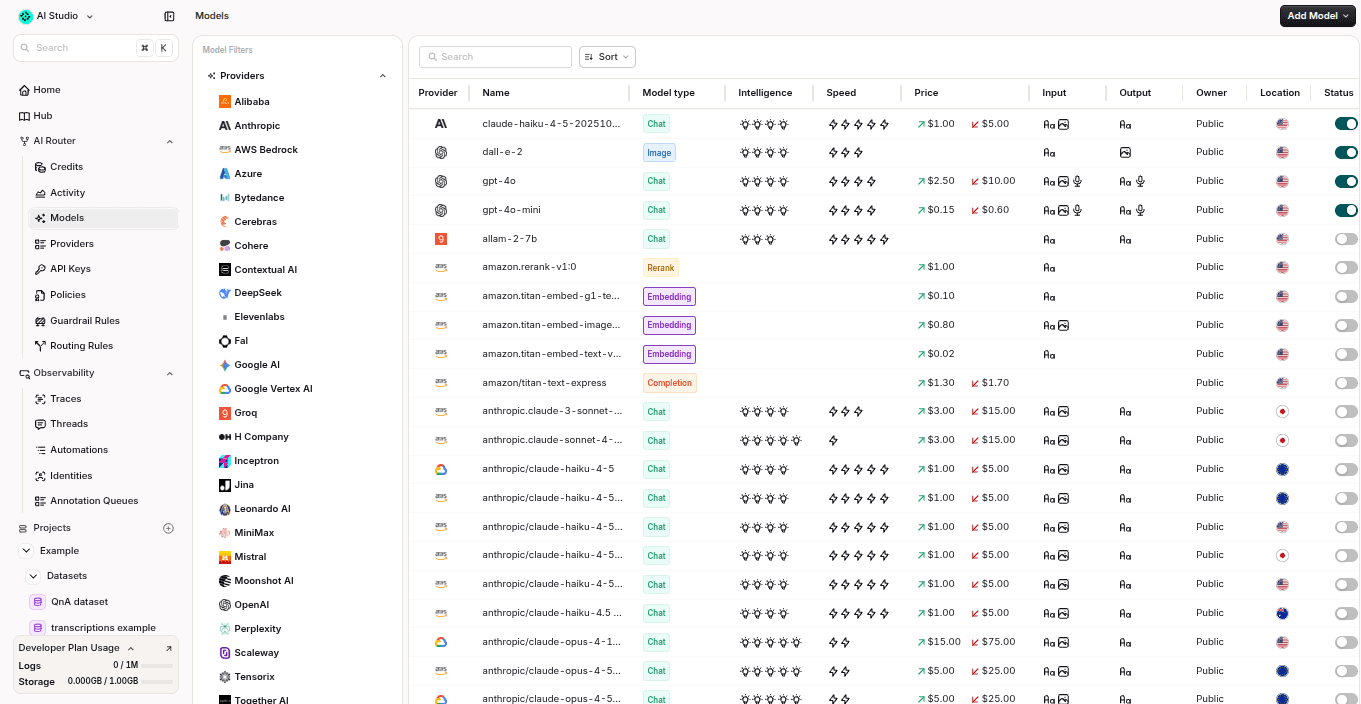
Example: routing rules give teams a visible place to manage model paths, fallback behavior, priorities, and provider choices.
With a router, the application sends the request in one format. The router handles the provider-specific work behind the route: authentication, request translation, model selection, logging, and usage tracking.
That changes the work in a fairly practical way.
If the team wants to test a new model, they don’t need to start by editing every service that calls the old one. If a fallback needs to be added, it doesn’t have to become another retry script copied into application code. If a default model changes, the team can update the route instead of turning the change into a small migration project.
The other benefit is visibility.
When every service calls providers directly, it’s easy for model behaviour to become scattered. One service has the default model. Another has the fallback. A provider dashboard has the cost data. Logs show part of the story, but not always the route’s decision.
A unified API gives teams a cleaner place to inspect that path. Which model handled the request? Which rule selected it? Did fallback trigger? Did the cheaper route change latency, cost, or output quality?
Core capabilities of an AI router
An AI router gives teams a place to define which models can be used, when fallback should trigger, who owns the request, and how each route is logged.
Unified model access: Call multiple models through one API instead of maintaining separate integrations for every provider.
Smart routing: Route requests based on workload needs, quality requirements, and runtime conditions.
Retries and failover: Move traffic to another model or provider when the first option times out, fails, or hits a rate limit.
Cost and budget controls: Track usage by model, provider, workflow, user, team, or customer, and set limits to avoid unexpected spend.
Observability: See which model handled a request, why it was selected, how long it took, whether fallback happened, and what it cost.
Identity and access control: Track who or what sent each request, and define which users, teams, or applications can access specific models.
Policy and governance: Enforce rules around approved providers, regions, BYOK, data residency, sensitive data, and model usage.
These controls only work if they’re connected. A cost rule shouldn’t move traffic to a cheaper model without a quality check. A fallback rule shouldn’t create a second production path no one monitors. A governance rule shouldn’t depend on someone remembering which service owns which API key.
Common AI routing strategies
AI routing is more than sending traffic to a backup model when something fails. A router can choose models based on cost, speed, quality, policy, region, or the type of task being handled.
We would start boring: one default model, one fallback, and a small set of examples that show whether the route is doing what the team expects. Adaptive routing comes later.
A customer support classifier won’t need the same model as a legal summarization workflow or a complex agentic task. We see teams end up combining several routing strategies rather than relying on one rule.
The route shouldn’t only optimize for one variable. A cheaper route that lowers quality, a faster route that breaks reliability, or a fallback route no one monitors can all create new problems. Routing works best when cost, latency, quality, and policy are evaluated together.
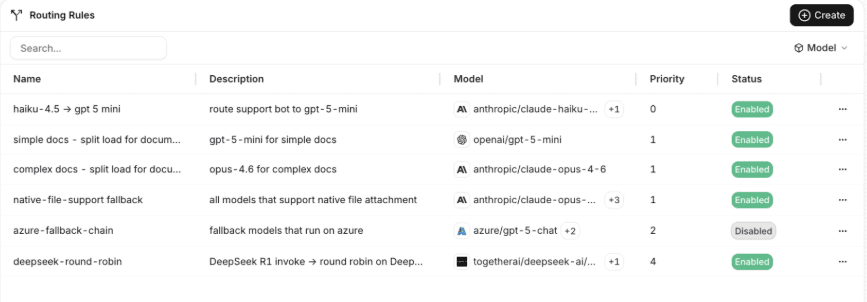
Example: routing rules give teams a visible place to manage model paths, fallback behavior, priorities, and provider choices.
Cost-based routing
Cost-based routing sends simpler requests to cheaper models and keeps stronger models for the work that actually needs them.
That sounds straightforward until you look at the cases in the middle. A cheaper model may be fine for extraction, but not for a customer reply. A premium model may be unnecessary for classification, but still the right call when the request is vague or high stakes. The router exists so teams can split those cases instead of forcing one model to handle everything.
For example, a support workflow might use a smaller model to tag tickets, extract fields, or rewrite short text. The customer-facing response can still go to a stronger model when the answer needs more care.
Latency-based routing
Latency-based routing prioritizes speed. The router can send requests to the model or provider that’s most likely to return a response quickly.
This is useful for user-facing workflows where delay affects the product experience, such as chatbots, copilots, autocomplete, search, or real-time support tools. In these cases, the fastest acceptable model may be better than the highest-scoring model.
The important word is acceptable. Low latency only helps if the answer is still accurate, useful, and safe enough for the use case.
Quality-based routing
Quality-based routing sends requests to the model most likely to produce the best answer for that task.
Some models perform better at reasoning. Others are stronger for summarization, coding, extraction, multilingual support, or following a strict format. A router helps teams align model strengths with the workflow, instead of relying on one default for every request.
We find this strategy works best when teams use evaluations to compare model performance. Without evals, quality-based routing can become guesswork.
Fallback routing
Fallback is easy to underestimate because it only gets attention when something breaks. A provider times out, a rate limit hits, or a region has an issue. Suddenly, the fallback path isn’t a backup detail. It’s part of the product experience.
That path needs the same scrutiny as the primary route. If it costs more, changes the answer, or responds more slowly, the team needs to know before users notice.
Region-aware routing
Region-aware routing sends requests based on geography, latency, data residency, or compliance needs.
For example, a European workflow may need to use EU-hosted infrastructure or avoid sending certain data to providers outside approved regions. A global product may also route requests closer to the user to reduce latency.
This becomes more important for teams operating across markets, regulated industries, or enterprise customers with stricter data requirements.
Policy-based routing
Policy-based routing uses internal rules to decide which models are allowed for specific workloads.
A company might allow experimental models for internal testing but restrict customer-facing or regulated workflows to approved providers. Sensitive data may require BYOK, private deployment, regional controls, or specific logging rules.
This helps teams stop model choice from becoming an informal developer decision buried inside application code.
Workload-based routing
Workload-based routing chooses models based on the type of task.
Classification, extraction, summarization, customer response generation, code assistance, translation, and agentic planning may all need different model profiles. A router maps workloads to different model profiles instead of forcing every request through the same default.
This is where cost, quality, and latency come together. The strongest model isn’t always the best choice. The best choice is the one that meets the requirement without wasting budget.
AI Router vs. AI Gateway vs. LLM Proxy: What's the Difference?
You might have seen the terms AI router, AI gateway, and LLM proxy used together. Even though they’re related, they don’t necessarily mean the same thing.
A simple way to think about it:
An LLM proxy forwards requests.
An AI router decides where requests should go.
An AI gateway manages the wider control layer around model traffic.
In practice, some platforms combine all three. A tool may call itself a gateway but include routing. A router may also include proxy behavior, logging, retries, and access controls. The difference is less about the label and more about what the tool actually manages.
Teams get into trouble when they buy for the label instead of the operating problem. A proxy, router, and gateway can overlap technically, but they solve different levels of maturity.
Term | What it does | Best for | Main limitation |
LLM proxy | Sits between the application and model providers, then forwards requests through a shared interface. | Teams that want basic provider abstraction or a single endpoint for model calls. | Usually lighter on routing logic, governance, evals, and production controls. |
AI router | Chooses which model or provider should handle each request based on routing rules. | Teams using multiple models that need smarter model selection, fallback, and cost control. | May still need a broader platform for observability, evals, prompt workflows, or governance. |
AI gateway | Adds a wider management layer around AI traffic, including access control, rate limits, logging, policy, observability, and sometimes routing. | Teams managing AI traffic across applications, teams, and providers. | Can be more platform than teams need if they only want simple model access. |
This differentiation seems trivial. But it definitely matters because we’ve seen teams buy for one problem, and then discover they have another.
If the issue is just “we don’t want every app to call providers directly,” a proxy is enough. If the issue is “we need to send different tasks to different models,” a router is the better fit. If the issue is “we need control, monitoring, policy, and governance around all AI traffic,” the team is usually looking for a gateway or a broader AI platform.
When do you need an AI router?
You probably don’t need an AI router the first time you add AI to a product.
If one application calls one model for one contained use case, a direct provider integration is usually fine. It may even be the better choice. There’s no reason to add routing infrastructure before there’s anything meaningful to route.
The warning sign is when model decisions stop belonging to one person, one service, or one prototype.
A useful rule of thumb: if the model decision only affects one prototype, direct integration is fine. If it affects several teams, customer-facing flows, or regulated data, it belongs in a routing layer.
The need usually shows up in a few ways.
The second or third provider arrives
This is the obvious one.
A team adds another provider because it’s cheaper for high-volume tasks. Then another gets added because it performs better on reasoning. Then fallback becomes necessary after a timeout or rate-limit issue.
At that point, the problem isn’t just “we use more than one model.” The problem is that each provider brings its own API shape, error behavior, pricing, and operational habits. If every team handles those differences separately, the integration work starts to multiply.
Fallback becomes part of the product
Fallback starts as a quick fix. A provider fails, a timeout hits, or a rate limit blocks a request, so someone adds a backup path.
That can work once. The risk is when every team builds its own version of fallback logic.
One service retries. Another switches providers. Another fails silently. Nobody has a clear view of when fallback triggered, what it cost, or whether it changed the answer. That’s when fallback stops being a small reliability fix and becomes something teams need to manage deliberately.
Model switches become code changes
Model choices don’t stay fixed for long.
A cheaper model becomes good enough for one task. A new model performs better on a specific workflow. A customer requirement rules out one provider for sensitive data. A region or procurement rule changes what can be used.
If the model name is hardcoded across services, each change becomes a lot more painful than it should be. Someone has to find the rule, update the code, test the path, and hope nothing else depends on the old behavior.
A router helps when model choice needs to change without turning every change into a small migration.
The bill stops explaining itself
Provider bills rarely tell the whole story.
They might show spend by model or account, but not always which prompt, route, workflow, customer, or team caused the increase. That becomes a problem when finance asks why spend jumped, or when engineering needs to know whether the issue is normal usage growth or inefficient routing.
This is where routing and cost visibility start to overlap. Teams need to trace spend back to the model decision that created it.
Routing rules start living in application code
This is one of the clearest signs.
If model selection, fallback behavior, budget rules, and provider restrictions all live inside application services, those services are doing more than calling models. They’re carrying routing policy.
That may be fine for one team. It doesn’t hold up when more people need to inspect, approve, or change those rules.
Sensitive data enters the picture
Some requests shouldn’t be allowed to go to any model, any provider, or any region.
Customer data, financial data, healthcare data, public-sector workflows, and regulated use cases need stricter rules: approved providers, BYOK, audit logs, data residency controls, or model restrictions.
At that point, “just call the model directly” becomes harder to defend. Teams need a consistent way to enforce what can go where.
The prototype becomes real
This is usually the moment teams feel the gap.
The model that was “good enough for now” starts serving real users. The fallback that was added quickly becomes part of the product experience. The cheaper route starts affecting quality. The provider choice becomes something security, finance, or compliance cares about.
At that point, the old way of deciding breaks down. Teams need repeatable rules, shared visibility, and a safer way to change routing without creating new risk.
Real-World Use Cases for an AI Router
An AI router is best used when different requests need different models, rules, or fallback paths. In production, that tends to happen quickly. One workflow needs speed. Another needs stronger reasoning. A third handles sensitive data. A fourth needs the cheapest model that can still do the job.
Not every use case needs sophisticated routing. Some only need a default model and a fallback. The useful cases are the ones where treating every request the same way becomes wasteful, risky, or hard to explain.
Customer support agents
Support teams use AI for ticket classification, suggested replies, knowledge-base answers, and agent assist workflows. Not every task needs the same model.
An AI router can send simple classification or summarization tasks to a lower-cost model, while routing complex customer replies to a stronger model. The mistake is treating every support interaction as the same level of difficulty. In practice, teams need a split between routine handling and higher-risk customer responses.
Internal copilots
Internal copilots look low-risk at first, but usage can spread quickly across departments. That makes identity, budget ownership, and access control important earlier than teams expect.
A router helps teams manage those differences through a central routing policy. For example, internal drafting tasks might use one model, data-sensitive workflows might use an approved provider, and complex analysis might route to a higher-capability model.
RAG applications
RAG workflows include retrieval, reranking, summarization, and final answer generation. Each step may benefit from a different model. They’re a good example of why routing should happen at the step level, not only at the application level.
A lightweight model might classify intent or summarize retrieved chunks, while a stronger model handles the final response. Routing also makes model comparisons easier across retrieval workflows.
Document processing workflows
Document workflows involve extraction, classification, summarization, validation, and review. These tasks can vary heavily in cost and difficulty.
A router can use cheaper models for structured extraction or simple classification, then reserve more advanced models for ambiguous documents, complex summaries, or high-risk decisions. This helps teams control cost while keeping quality where it matters most.
Multi-region AI deployments
Global products may need to route requests based on latency, provider availability, or data residency requirements.
An AI router can send traffic to providers or regions that meet local requirements. That helps teams serve users faster while keeping sensitive workloads within approved boundaries.
Regulated AI workflows
Banks, insurers, healthcare companies, and public-sector teams need stricter rules around which models can process certain data.
A router can help enforce those rules. Teams can restrict sensitive workflows to approved providers, apply BYOK, route through specific regions, track identity, and keep clearer records of how model traffic was handled.
High-volume, cost-sensitive workloads
Some AI workloads run at large scale: support automation, content enrichment, search, moderation, routing, tagging, or product recommendations.
For these workflows, small cost differences add up a lot quicker than you’d expect. An AI router can send routine requests to lower-cost models, reserve premium models for harder cases, and monitor how routing affects both cost and quality.
How an AI router helps cut LLM costs
LLM cost control isn’t just about choosing cheaper models. It's about avoiding unnecessary overuse of premium models while protecting the quality of the workflows that need them.
Without routing, we notice teams default to one of two patterns. They either send too much traffic to a premium model, which raises costs. Or they switch too aggressively to cheaper models, which can hurt quality. We find that neither approach works well in production.
An AI router gives teams a more flexible path. It can send simple requests to lower-cost models, reserve stronger models for complex tasks, and fall back only when needed. That means teams can reduce blended LLM spend without treating every workflow as a cost-cutting exercise.
In our view, the wrong approach is a blanket downgrade. The better approach is to define where quality matters, where lower-cost models are already good enough, and where evals should block a route change.
For example, not every request needs advanced reasoning. A support workflow may include classification, summarization, rewriting, retrieval, and final answer generation. The classification step might work well on a smaller model. The final customer-facing response may need a stronger one. A router lets teams split those tasks instead of sending the whole workflow through the same expensive model.
For example, take a support workflow with 10 million LLM calls per month, averaging 500 input tokens and 250 output tokens per call.
If every request runs on GPT-4o, using public pricing of $2.50 per 1M input tokens and $10.00 per 1M output tokens, the monthly cost is about $37,500.
If an AI router sends 60% of requests to GPT-4o mini at $0.15 per 1M input tokens and $0.60 per 1M output tokens while keeping 40% on GPT-4o, the cost drops to roughly $16,350. Roughly $21,150 saved per month or a 56% reduction.
What to look for in an AI router
The best AI router isn’t the one with the longest model list. Model coverage is useful, but teams operating AI at scale also need control over routing, reliability, cost, observability, and governance.
A good router should make the route explainable. You should be able to see not only which model answered, but also why that model was selected, which rule applied, whether fallback happened, and what changed after the route was updated.
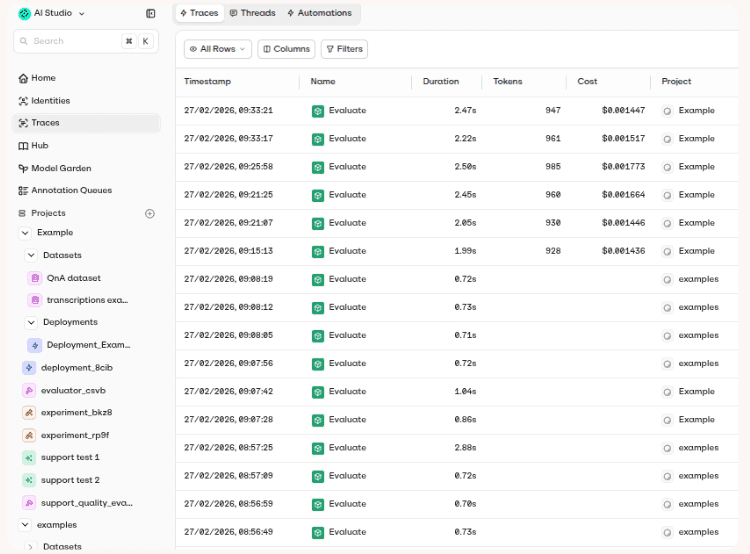
Example: request traces help teams inspect duration, token usage, cost, and project-level activity after AI traffic moves through a shared routing layer.
Provider and model coverage
Start with the models your team actually uses. The router should support your current providers, the models you are testing, and the ones you may need later.
Broad coverage helps, but only if it comes with enough control. A large model catalog is less useful if teams cannot route, monitor, and govern usage properly.
Unified API design
A good AI router should give teams one clean interface for working across providers. OpenAI-compatible APIs are especially useful because they reduce migration work and make it easier to adopt the router without rewriting large parts of the application.
Routing flexibility
Look for routing rules that match how your workflows actually behave. Teams may need routing rules that reflect performance, spend, compliance needs, provider health, and workload type.
Static routing is useful at the start. Dynamic routing becomes more valuable when teams need to balance quality, speed, and cost across many requests.
Reliability features
Live AI traffic needs recovery paths. The router should support retries, timeouts, rate limits, and automatic failover when a provider is unavailable or slow.
Reliability features should also be visible. Teams should also see when failover happened and whether it changed cost, latency, or quality.
Cost and budget controls
The router should help teams trace spend back to the workflow that created it. Look for cost tracking by model, provider, workflow, user, team, customer, or application.
Budget controls add another layer of protection. Teams should be able to set limits, track usage trends, and spot expensive routing behavior before it becomes a finance problem.
Observability and tracing
An AI router should show what happened to each request. That includes the selected model, routing decision, latency, token usage, cost, errors, and recovery paths.
If the router also connects with traces, evaluations, or monitoring tools, teams can better understand whether routing decisions improved the system or only changed the path traffic took.
Evaluation integration
Routing shouldn’t be based on cost alone. Teams need a way to test whether a lower-cost model still produces answers that are accurate, grounded, and usable.
Look for routers that connect with evals, experiments, or quality monitoring. This helps teams compare models safely before moving traffic in production.
Security and governance
Teams should look for controls around API keys, BYOK, RBAC, audit logs, data retention, approved providers, regional routing, and sensitive data handling.
Teams need these controls once AI calls appear in more departments or regulated workflows. Without them, model access becomes difficult to approve, monitor, and audit.
How to get started with an AI router in under an hour
Contrary to popular belief, getting started with an AI router doesn’t need to be a large migration. We usually recommend starting with one contained workflow, one provider key, and one route.
1. Choose one workflow to route first
Start with a workflow that already uses an LLM and has clear success criteria. Good examples include:
Support classification
Ticket summarization
Internal search
Document extraction
Simple chatbot flow.
Avoid starting with your most complex agent. Pick something useful, but contained.
2. Connect your model providers
Next, connect the providers your team already uses. Depending on the router, this means adding provider API keys, using bring-your-own-key, or using managed model access through the platform.
At this stage, keep the setup simple. One primary model and one fallback model are enough to prove the pattern.
3. Update the API endpoint
Most routers let teams keep a familiar request format. If the router is OpenAI-compatible, the migration may be as simple as changing the base URL and API key in your existing code.
image
This is the main advantage of a unified API. The application doesn’t need to know every provider behind the route.
4. Create a basic route
Set a default model for the workflow. Then define what should happen if the default route fails.
For example, a support summarization workflow might use a lower-cost model by default and fall back to another provider if the first request fails, times out, or hits a rate limit.
5. Add usage and spend tracking
Once traffic flows through the router, check whether you can see usage by model, workflow, user, team, or application.
This step matters early. If teams wait for a billing surprise, they won't have enough history to find the cause.
6. Test routing behavior
Run a small set of test requests before sending live traffic.
Check the basics
Response quality
Latency
Fallback behavior
Error handling
Logging
Cost reporting
If the workflow has evals, run them before and after the routing change. The route should simplify access without lowering output quality.
7. Roll out gradually
Start with a small percentage of traffic or one internal workflow. Monitor cost, latency, errors, and output quality before expanding.
Once the first route is stable, you can add more models, more recovery rules, and more advanced routing strategies if needed. The router becomes more valuable as more AI traffic moves through the same shared layer.
Common pitfalls and how to avoid them
An AI router can simplify multi-model access, but only if teams use it as a shared control layer.
Poor routing rules can turn the router into another place where complexity hides.
Here’s some of the most dangerous pitfalls we’ve noticed teams fall into and how you could avoid them:
Routing only by cost: Cheaper models can work well for simple tasks, but not every workflow should move to the lowest-cost option. Use evals to define where cheaper models are safe and where stronger models are still needed.
Ignoring fallback costs: Fallback improves reliability, but backup models may be slower, more expensive, or less consistent. Monitor when fallback happens, why it happens, and how much spend it adds.
Keeping routing logic in application code: If model rules still live inside each service, the router cannot do its job properly. Keep routing decisions centralized so teams can review, update, and govern them.
Skipping observability: Teams need to see which model handled each request, how long it took, and whether recovery paths were used. Without that visibility, routing becomes another black box.
Optimizing before defining quality: Smart routing only works when teams know what “good enough” means. Test cheaper or faster models against real examples before moving production traffic.
Not tracking identity or ownership: Anonymous AI traffic makes cost control and governance harder. Track usage by application, team, user, customer, or workflow so teams know where demand comes from.
Expanding model access without policy: A unified API makes it easier to use more models, but not every model should be available for every workload. Define approved models, regions, and data-handling rules before adoption grows.
Most routing problems aren’t caused by the router itself. They’re actually caused by unclear ownership: no quality threshold, no fallback policy, no cost owner, or no rule for which models are approved.
Where Orq.ai Router fits
By the time teams look for a router, the problem usually isn’t “we need one more model.” It’s that model decisions have started to spread across code, teams, dashboards, and informal rules.
That’s the gap Orq.ai Router is built around.
Teams get one OpenAI-compatible API for accessing 400+ models across 20+ providers. But the point isn’t just breadth. The point is to give routing decisions somewhere visible to live: which model handled the request, which rule selected it, whether fallback triggered, what it cost, and which user, team, or workflow created the demand.
Orq.ai Router is designed for that operating reality. It supports retries, timeouts, rate limits, automatic failover, budget controls, and identity tracking. Its smart routing can move routine requests to lower-cost models while keeping harder or higher-risk workflows on stronger models.
This is also where Orq.ai’s wider platform story matters. Teams can use Orq.ai Router as a standalone product, but routing doesn’t stay isolated for long. In the full Orq.ai platform, routing connects with evaluations, knowledge workflows, observability, guardrails, and deployment controls.
“A router should help teams understand why that route was chosen, what it cost, and whether the answers are good enough to use.” - Sohrab, Orq.ai founder
That’s also why homegrown routing can start to show its limits. It may work when one team owns the logic and traffic is still small. The challenge comes later, when routing has to support higher volume, cost monitoring, observability, and governance across more workflows.
bunq ran into that problem directly. Benjamin Kleppe, GenAI Lead at bunq, said the team had built its own LLM routing setup, but maintaining it became expensive and time-consuming while gaps remained around observability and performance.
From model access to model control
Multi-model AI gives teams more choice. But if no one can see where the model decisions live, that choice turns into integration overhead, cost drift, and routing behavior no one fully owns.
Without centralized routing, every new model adds more code, more keys, more fallback logic, and another source of spend. A unified API changes that. It gives teams a way to inspect, update, and govern model decisions without scattering those rules across application code.
Smart routing adds another layer of control. Instead of sending every request to the same model, teams reserve stronger models for harder cases and use lower-cost options where they’re enough.
That turns multi-model access from a growing maintenance problem into a practical advantage: lower integration overhead, better reliability, and faster model experimentation.
Book a demo to see how your team can route across models, control spend, and understand why each request went where it did with Orq.ai Router.

Sohrab Hosseini
Co-founder (Orq.ai)
About
Sohrab is one of the two co-founders at Orq.ai. Before founding Orq.ai, Sohrab led and grew different SaaS companies as COO/CTO and as a McKinsey associate.