
What Is an AI Gateway? Architecture, Benefits & How to Choose One
Learn what an AI gateway is, how it works, its architecture and benefits, and how to choose the right one for enterprise-grade governance and multi-LLM access.

Sohrab Hosseini
Co-founder (Orq.ai)

Bring LLM-powered apps from prototype to production
Discover a collaborative platform where teams work side-by-side to deliver LLM apps safely.






Time and time again, we always end up seeing that AI applications rarely stay tied to one model for a long time.
Each provider brings its own APIs and regional constraints. You start with a simple integration. Then it turns into a scattered AI stack. Engineers struggle to track usage. Finance struggles to explain spend. And governance teams struggle to see which models are handling which data.
That’s why we firmly believe teams need to really understand how important AI gateways actually are. As multi-model adoption grows, the market for AI gateway infrastructure is projected to reach around $9.8 billion by 2031. We’re seeing a big shift from direct model integrations toward centralized access.
We’ll take a look at what an AI gateway is, how the infrastructure works, and where it differs from an API gateway.
What is an AI gateway?
An AI gateway sits between applications and model providers. Instead of every product or agent connecting separately to various model providers, requests pass through one control layer.
In plain terms, it gives teams one managed entry point for LLM traffic.
Production AI systems usually need more than just model access. They need:
Cost tracking
Routing rules
Usage limits
Observability
Policy enforcement
Consistent governance
Otherwise each application ends up managing those concerns separately.
What an AI gateway Is not
Note that an AI gateway won’t replace every part of your AI stack despite giving you a central control layer for model traffic. A big mistake is to treat it as a complete solution for every problem around AI development and evaluation.
It isn’t a standard API gateway with a new label. Traditional API gateways manage traffic between services like:
Authentication
Rate limits
Routing
Load balancing
Security
Even though AI gateways can handle some of those same concerns, they need LLM-specific controls like token tracking and provider switching.
Moreover, it shouldn’t be confused with a model marketplace. Some gateways provide access to various models. But access alone doesn’t solve production problems. You’ll still need reliability controls and budget management, as well as a way to keep AI behavior consistent across workflows.
Why do AI gateways matter now?
LLM infrastructure has become a lot harder to manage with direct provider integrations alone.
A few years ago, most AI applications you encountered used one model provider and API key. The architecture was simple enough: application in, model response out. That setup worked for prototypes and early experiments. But in our experience, it wouldn’t hold up well once AI became a part of real products or internal workflows.
Subscription and integration sprawl
As teams add more providers, they also add more API keys, accounts, invoices, SDKs and internal owners.
Recent surveys of large enterprises suggest more than half already use three or more model providers across different products or regions, often without a single team owning the full picture.
One application may use three providers. Another may use a different set entirely. A product team may keep an old integration running because it still supports one workflow.
Over time, nobody has a complete view of which models are active or who owns each key.
An AI gateway helps regain control by creating one managed access layer. Applications connect to the gateway, while the gateway manages provider connections and access controls behind the scenes.
Environment drift
Provider differences create subtle engineering problems. Authentication works differently. Retry behavior varies. Streaming responses don’t always follow the same pattern. Error handling changes from one SDK to another. A timeout policy that works for one provider may cause problems with another.
These small differences matter in production.
Without a gateway, each application needs to handle those details itself. That creates drift between team and workflows. One service may have good fallback logic. Another may fail immediately. One team may log token usage carefully. Another may only track request counts.
Regional latency and model churn
Model performance changes quickly. New versions launch. Old versions get deprecated. Provider latency varies by region. Some models work better for reasoning, while others perform well for classification, extraction or summarization. The “best” model for a workflow may change several times a year.
Hardcoded integrations make that a lot more painful than it needs to be. Switching providers or models can require code changes and coordination across teams.
An AI gateway makes the stack more flexible. Teams can route traffic based on region, latency, task type, budget or availability without rewriting application logic every time the model layer changes.
Cost unpredictability
LLM costs don’t always grow in obvious ways. A workflow may keep the same request volume but become more expensive because prompts get longer, outputs expand, retries increase or fallback traffic shifts to a premium model.
Provider invoices usually show the bill after the fact. They don’t always explain which feature or route caused the increase.
Spend can be broken down by model, provider, key, user, workflow, environment or application. That makes optimization more practical, whether you’re reducing context size or moving simple tasks to cheaper models.
How an AI gateway works: architecture explained
An AI gateway works by creating a controlled path between applications and model providers. Instead of each application managing provider-specific integrations on its own, requests move through the gateway first.
The gateway then applies the right routing and observability controls before sending the request to a model. The application still sends a model request. But the operational work happens in the gateway layer.
Let’s take a closer look at the step-by-step process involved:
1. The application sends a request to the gateway
The process starts when an application, agent or workflow sends a prompt to the AI gateway.
It could be a:
Chat message
Summarization task
Classification request
Multi-step agent call
More often than not, the application sends the request through a standardized API. Many gateways use an OpenAI-compatible format. Developers don’t need to rewrite large parts of the application when switching providers.
2. The gateway authenticates the request
The gateway checks whether the request has permission to run.
It seems trivial, but it matters because production AI usage often spreads across different teams. Without a shared access layer, every team may manage its own provider keys. It makes usage harder to control and harder to audit.
3. The gateway applies metadata and policies
Next, the gateway attaches or reads metadata like application, environment, user, team, workflow, customer account or region. That context helps with routing and governance.
Furthermore, the gateway can also apply policies before the request reaches a model.
In one instance, it may block certain inputs or prevent unapproved providers from handling certain workflows.
4. The gateway selects the model or route
Once the request passes initial checks, the gateway decides where to send it. Some routes are static. For example, all summarization requests may go to one model. Others are dynamic, based on cost, latency, task complexity, provider availability, region or quality requirements.
This is where the gateway starts acting as more than a pass-through layer.
5. The request goes to the selected provider
The gateway forwards the request to the chosen model provider. It handles provider-specific details such as authentication, request formatting, timeout behavior, streaming differences and retry logic.
This reduces application complexity. Developers don’t need to maintain separate code paths for every provider’s SDK or API behavior.
6. The gateway tracks the response
When the model returns a response, the gateway records what happened. Useful traces may include the selected:
Model
Provider
Route
Prompt
Output
Token count
Latency
Cost
Retry attempts
Fallback events
Policy decisions
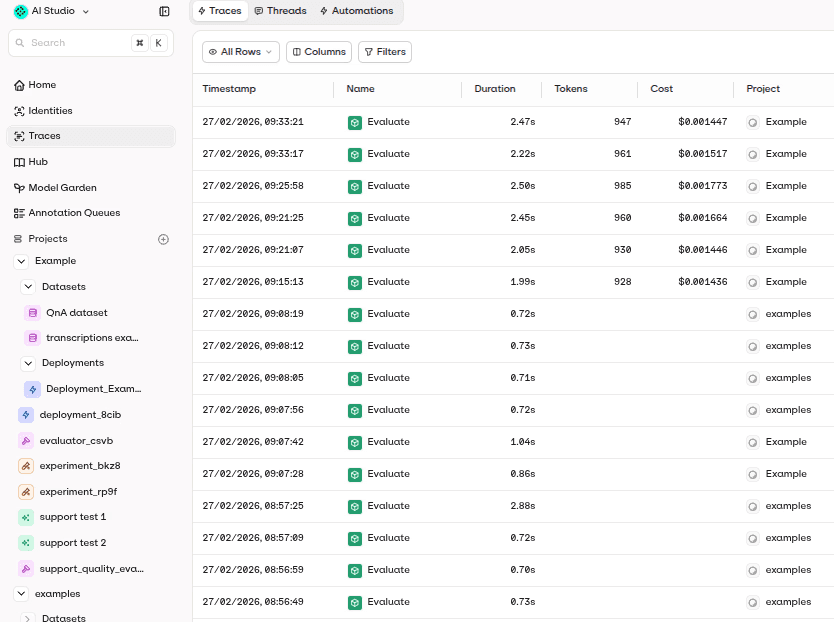
You get a clearer view of production AI behavior. If costs rise or quality drops, the gateway trace helps explain why.
7. The response returns to the application
Finally, the gateway sends the response back to the application in the expected format. From the user’s perspective, the workflow continues normally. Behind the scenes? The gateway handled routing and monitoring.
Applications can keep focusing on the user experience while the gateway manages the model infrastructure layer.
Deployment methods
AI gateways can be deployed in different ways depending on security requirements and how much control your enterprise wants over its infrastructure.
Managed cloud gateway
A managed cloud gateway runs as a vendor-hosted service. You connect your applications to the gateway and use built-in dashboards for monitoring and control.
We find this approach usually works well when teams want faster setup and lower maintenance. But you’ll need to review the vendor’s security and data handling carefully.
Self-hosted gateway
A self-hosted gateway runs inside the enterprise’s own infrastructure. You get a lot more control over networking and security configuration.
Self-hosting can suit firms with strict internal requirements, private deployments or sensitive workloads. Remember that it also shifts more responsibility to the internal platform team. They’ll need to manage uptime, upgrades, and incident response.
Hybrid deployment
We worked with some organizations that use a hybrid setup.
Sensitive workloads route through a private or self-hosted gateway. Meanwhile, lower-risk workflows use a managed cloud gateway.
Hybrid deployments give teams flexibility, but they need clear policies. Without careful design, hybrid setups can recreate the same sprawl the gateway was meant to reduce.
Edge or regional gateway deployment
For latency-sensitive or region-specific workloads, gateways can end up deployed closer to users or data centers. That way, you reduce response times and keep traffic within required geographic boundaries.
If your firm has applications that serve users across several markets or need to meet data residency requirements, regional deployment is one option you should consider.
Ultimately, the right deployment model is going to depend on your specific use case. A startup building a lightweight AI feature probably prefers a managed gateway. A bank or healthcare company might need private deployment and regional routing.
Core components of an AI gateway
A production AI gateway usually includes several core components:
Unified API layer: Gives applications one consistent interface for calling different models and providers, often through an OpenAI-compatible API.
Provider connection management: Handles credentials, provider-specific request formats, authentication, streaming behavior and response normalization.
Routing engine: Sends each request to the right model based on task type, cost, latency, quality requirements, region or availability.
Fallback and retry logic: Keeps workflows running when a provider times out, rate-limits requests or returns an error.
Rate limits and usage controls: Prevents individual users, teams, applications or API keys from consuming more capacity than intended.
Budget management: Tracks and controls spend by model, provider, project, workflow, customer account or team.
Observability and tracing: Captures prompts, outputs, token usage, latency, cost, errors, retries, fallbacks and route decisions.
Identity and metadata tracking: Links each request to the right user, team, application, environment, workflow or customer account.
Policy and guardrail layer: Applies rules for sensitive data, approved models, provider access, moderation, data residency, and restricted workflows.
Caching layer: Reuses previous responses or semantic matches where appropriate to reduce cost and latency.
Audit logs: Creates a record of model usage, routing decisions, policy events and access activity for governance and incident review.
Put together, all the aforementioned components turn the gateway from a simple access layer into the operating layer for production LLM traffic.
AI gateway vs API gateway vs LLM proxy vs LLM router
Take a look at the table below to see the differences between an AI gateway, API gateway, LLM proxy, and LLM router.
Layer | Main role | What it usually handles | Where it falls short |
API gateway | Manages traffic between applications and backend services. | Authentication, rate limits, load balancing, request routing, security policies and service-level monitoring. | Not built specifically for LLM traffic. It usually lacks token tracking, model routing, prompt/output tracing, provider fallback logic and AI-specific cost controls. |
LLM proxy | Forwards LLM requests through an intermediate layer. | Basic request forwarding, provider abstraction, logging, simple key management and sometimes OpenAI-compatible access. | Useful as a lightweight access layer, but often limited for production governance, dynamic routing, eval integration, policy enforcement and multi-team cost attribution. |
LLM router | Decides which model should handle each request. | Model selection based on cost, latency, quality, task type, provider availability, region, fallback rules or policy constraints. | Strong for runtime decision-making, but may not cover the full gateway layer unless paired with observability, budgets, access control, audit logs and governance workflows. |
AI gateway | Centralizes access, control and monitoring for AI model traffic. | Unified model access, routing, retries, fallbacks, token tracking, budgets, tracing, policy controls, provider management, audit logs and governance visibility. | Adds infrastructure complexity. For a single-provider prototype or low-volume internal tool, a full gateway may provide more control than the use case needs. |
To make the distinction simple, think of this way.
An API gateway manages general application traffic, an LLM proxy forwards model calls, an LLM router chooses the best model for a request, and an AI gateway brings those AI-specific controls together into one production layer.
Why AI gateways matter in 2026
When it comes to managing the model layer, direct integrations won’t cut it anymore.
A lot of teams we worked with are looking into how to run their LLMs safely across products and internal workflows. They need a production AI stack that has reliability and cost control across numerous models and providers.
Regulations like the EU AI Act also push in the same direction by requiring logging, traceability, and clear accountability for how AI systems behave in production.
Model choices are expanding day-by-day. OpenAI, Anthropic, Google, Mistral, Meta, Cohere, xAI. The list goes on and each has their own strength. One model may be better for reasoning. Another for long context. Another for speed. Another for cost-sensitive tasks.
Teams want that flexibility without having every application hardcoded to a different provider.
Not to mention that costs are much harder to predict than before. LLM spend can rise because usage grows. But it also can increase because of longer prompts or agents making more calls. Without a shared gateway layer, those cost drivers are difficult to see until the bill arrives. A familiar feeling for a lot of teams.
That shift is reflected in the market. Spending on LLM observability and gateway platforms is forecast to grow from under $3 billion in 2026 to more than $9 billion by 2030.
AI gateways help because they create a shared runtime layer. Applications can keep building AI features while platform teams manage model access and observability from one place.
Key benefits of an AI gateway
An AI gateway gives teams a more controlled way to run LLM traffic across applications, providers and workflows.
The main benefits include:
Simpler multi-model access: Applications can connect to one gateway instead of maintaining separate integrations for OpenAI, Anthropic, Gemini, Mistral, self-hosted models and other providers.
Less vendor lock-in: A gateway makes it easier to switch models, add providers or test alternatives without rewriting application logic every time the model layer changes.
Better cost visibility: Teams can track spend by model, provider, workflow, user, team, project or API key, making it easier to find the real drivers behind LLM costs.
More reliable AI workflows: Retries, timeouts and fallback routes help applications keep working when a provider becomes slow, unavailable or rate-limited.
Clearer ownership: Metadata and identity tracking connect each request to the right user, team, application, workflow or customer account.
Faster experimentation: Teams can test new models, compare providers and adjust routes without rebuilding every integration from scratch.
Stronger auditability: Logs and traces create a record of model usage, policy decisions and provider activity that can support security reviews, compliance workflows and incident investigations.
Lower engineering overhead: Shared infrastructure reduces duplicated work around SDKs, keys, billing, monitoring, retry logic and provider-specific behavior.
When do you actually need an AI gateway?
Not every AI project needs a gateway on day one.
A small prototype using one model and low traffic can run safely with direct API calls and basic provider dashboards.
You’ll find that the need becomes clearer once AI moves into production and the model layer starts carrying operational risk.
Consider an AI gateway when:
You use three or more model providers in production. Separate integrations, keys, billing, SDKs and dashboards become harder to manage as provider count grows.
You need fallback models. If a provider times out, hits rate limits or suffers an outage, the gateway can route requests to a backup model without every application managing that logic separately.
You run agentic workflows with multi-step calls. Agents often call models several times for planning, retrieval, tool use, validation and summarization, so teams need a central place to trace cost, latency and failures across the full sequence.
You need cost attribution by workflow or team. A gateway helps show whether spend comes from one application, one customer account, one route, one model or one team’s usage.
You operate in a regulated or enterprise environment. Data residency, approved model lists, audit trails, access controls and policy enforcement become much harder when every application connects to providers on its own.
You need consistent monitoring across providers. Provider dashboards only show their own slice of usage. A gateway gives a shared view across the model layer.
You want routing based on cost, latency, quality or region. Once model selection becomes dynamic, routing logic belongs in a shared layer rather than scattered through application code.
You probably don’t need a full AI gateway if you’re building a low-volume prototype, using one provider, serving one application and don’t yet need fallback logic, audit trails, budget controls or multi-provider routing. In that case, provider dashboards, lightweight proxying or free open-source tools may cover enough.
Open-source vs. managed AI gateways
AI gateways usually fall into two broad categories: open-source gateways that teams deploy and operate themselves and managed gateways that provide model access and governance as a hosted platform.
Neither option is universally better.
The right choice depends on how much control your enterprise needs and how much infrastructure it wants to maintain.
A simple way to frame it:
Requirement | Open-source / self-hosted gateway | Managed gateway |
Infrastructure control | Stronger | Depends on vendor and deployment model |
Setup speed | Slower | Faster |
Maintenance burden | Higher | Lower |
Customization | Stronger | Depends on platform |
Built-in observability and governance | Varies by project | Usually broader |
Internal engineering effort | Higher | Lower |
Vendor dependency | Lower for gateway layer | Higher for gateway layer |
Best fit | Platform-heavy teams with strict control needs | Teams that need production capabilities quickly |
For many organizations, the best answer may not be purely one or the other. Sensitive workloads may run through a private or self-hosted layer, while lower-risk workflows use a managed gateway. The important point is to avoid recreating the same sprawl the gateway was meant to solve. Whether open-source or managed, the gateway should give teams a clearer, more consistent way to control model access, cost, reliability and governance.
How to choose the right AI gateway: evaluation criteria
Choosing an AI gateway isn’t only a technical decision.
“If switching models is a project and not a configuration, you’re already locked in. A good gateway makes that distinction obvious” - Sohrab Hosseini, Orq.ai co-founder
The gateway becomes part of the production path between your applications and the models they depend on, so the evaluation should cover engineering fit, governance requirements, deployment constraints and long-term operating needs.
Use the following criteria to assess whether a gateway can support your AI stack beyond the first integration.
1. Model and provider coverage
Start with the models and providers the gateway supports. At minimum, it should cover the providers your teams already use and the ones you’re likely to test next.
Look for support across commercial APIs, open-source models, self-hosted deployments and regional providers where relevant. Broad model access matters, but quality of integration matters too. The gateway should handle provider differences around authentication, streaming, rate limits, error handling and response formats without pushing that complexity back into application code.
2. API compatibility and developer experience
A strong gateway should make integration easier, not create another layer of engineering work.
OpenAI-compatible APIs can help teams adopt the gateway without rewriting large parts of existing applications. Clear documentation, SDK support, reliable error messages, testing tools and simple configuration also matter. If developers need to fight the gateway every time they add a model or route, adoption will stall.
The best gateway feels like infrastructure: important, visible when needed, but not constantly in the way.
3. Routing and fallback capabilities
Routing sits at the center of most production AI gateway use cases. Check whether the gateway supports static routing, rule-based routing, cost-based routing, latency-aware routing, fallback chains, regional routing and policy-based model selection.
Fallback behavior deserves particular attention. Teams should be able to define what happens when a provider times out, rate-limits requests, returns an error or fails quality checks. A good gateway should make fallback behavior observable, configurable and testable, not hidden behind a black box.
4. Cost controls and budget management
LLM costs can rise quickly when usage spreads across teams and workflows. The gateway should help teams track and control spend by model, provider, application, project, workflow, API key, user or customer account.
Look for token-level usage tracking, budget limits, alerts, cost dashboards, caching and routing rules that can shift suitable workloads to lower-cost models. Cost controls should also connect to ownership. Knowing the total bill matters, but knowing which workflow caused it matters more.
5. Observability and tracing
A gateway without strong observability may very well become another blind spot.
At minimum, the platform should capture request volume, tokens in and out, latency, cost, errors, retries, fallbacks and route decisions.
For more advanced AI systems, it should also support:
Prompt and output tracing
Tool calls
Retrieved context
Metadata
User identity
Workflow-level views
Good observability helps teams answer operational questions quickly: which model handled this request, why did it route there, what did it cost, did a fallback run, and which prompt or workflow caused the issue?
Challenges and limitations to watch out for
Challenge | What can go wrong | How to manage it |
Added infrastructure complexity | A gateway adds another layer between applications and model providers, which can create extra configuration, testing and operational work. | Start with the workflows that need the gateway most, such as multi-provider routing, fallbacks, cost controls or regulated use cases. |
Gateway dependency | If the gateway becomes unavailable or slow, AI features that depend on it may also be affected. | Review uptime, failover design, regional availability, latency impact and incident response before choosing a gateway. |
Incomplete provider abstraction | Providers differ in tool calling, streaming, context windows, multimodal support, errors and model behavior, so abstraction may not cover every edge case. | Test the specific features your applications use instead of assuming every provider works the same behind one API. |
Hidden quality regressions | Routing to cheaper or faster models can reduce output quality if teams only monitor cost and latency. | Connect gateway traces to evals, feedback and regression tests before shifting production traffic. |
Observability gaps | Some gateways capture basic usage but miss prompt versions, tool calls, retrieved context, fallback reasons or workflow metadata. | Define the trace data you need upfront and check whether the gateway can capture it at the right level of detail. |
Governance overconfidence | A gateway can support policy enforcement and audit trails, but it doesn’t make an AI system compliant by itself. | Pair gateway controls with wider governance processes, risk reviews, documentation, vendor management and human oversight where required. |
Data retention and privacy risks | Logs may contain prompts, outputs, user identifiers, retrieved context or sensitive business data. | Set clear rules for what gets logged, how long it’s retained, who can access it and when redaction or masking should apply. |
Vendor lock-in at the gateway layer | A managed gateway can reduce lock-in to model providers while creating dependency on the gateway vendor itself. | Review BYOK support, export options, pricing terms, contract flexibility and migration paths before committing. |
Cost of ownership | Open-source gateways may look cheaper but require engineering time for hosting, scaling, upgrades, monitoring and support. | Compare total operating cost, not just license or subscription price. |
Poor metadata discipline | Without consistent metadata, teams may struggle to attribute cost, latency, quality issues or policy events to the right owner. | Standardize metadata for application, environment, user, team, workflow, customer account and route from the start. |
Misconfigured fallbacks | Fallbacks can quietly send traffic to expensive, slower or less suitable models. | Monitor fallback rate, fallback destination, reason codes and quality impact regularly. |
One-size-fits-all routing | A route that works for summarization may fail for reasoning, code generation, retrieval or sensitive workflows. | Group tasks by complexity, risk, latency needs and quality requirements, then define routing rules per workflow. |
How Orq.ai approaches AI gateway and routing for production AI
Scattered integrations, unpredictable spend, no tested fallback share a common root: nothing sits between the application and the models it depends on. That's the gap Orq.ai's AI gateway is built to close.
One OpenAI-compatible API connects your stack to 400+ models across 20+ providers, with BYOK so there's no vendor markup between you and the model.
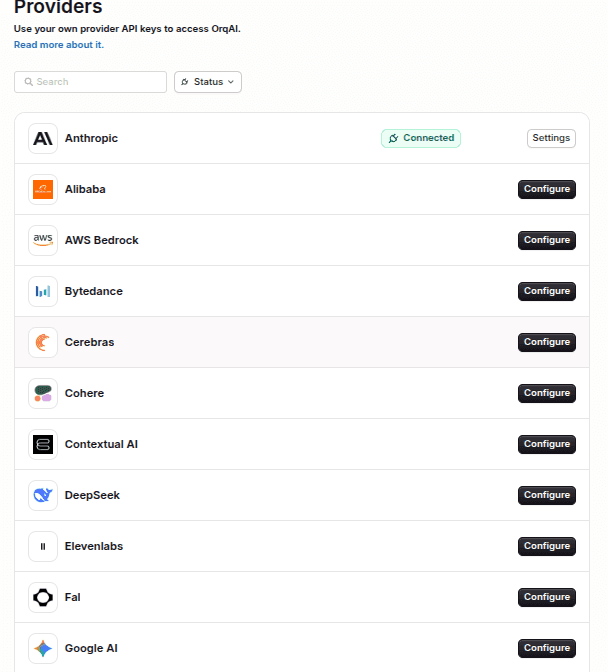
Fallback chains run automatically when a provider rate-limits or goes down. EU data residency, SOC 2, HIPAA, GDPR, and EU AI Act compliance are built in from the start, not added later.
Bringing control to the multi-model AI stack
Running AI in production has never involved just one model, and in 2026, the gap between teams that manage that well and teams that don't is widening fast.
An AI gateway gives you that layer. Not as a workaround, but as the right architectural choice once AI moves beyond a single prototype into real workflows. The teams that invest in it early spend less time firefighting provider changes or rebuilding integrations every time the model landscape shifts.
Orq.ai is built for exactly that point in the journey. If that's where your team is headed, book a demo and we'll walk through what that looks like for your stack.

Sohrab Hosseini
Co-founder (Orq.ai)
About
Sohrab is one of the two co-founders at Orq.ai. Before founding Orq.ai, Sohrab led and grew different SaaS companies as COO/CTO and as a McKinsey associate.