
AI Agent Routing: Directing Tasks to the Right Model or Agent
Learn how AI agent routing directs tasks to the right specialised model or agent patterns, techniques, and how to build reliable multi-agent systems.

Sohrab Hosseini
Co-founder (Orq.ai)
Key Takeaways
Agent routing sits above model and tool routing, it decides which specialized agent should own a task, while that agent then decides which models and tools to use internally.
Routing mistakes are silent killers; a request sent to the wrong agent produces plausible-sounding hallucinations, so you need end-to-end tracing to see which agent was chosen and why.
The real value of agent routing isn't adding more agents, it's having a consistent decision layer that enforces constraints, prevents misrouting, and lets you tune behavior with production feedback instead of ad-hoc patches inside each agent.
Bring LLM-powered apps from prototype to production
Discover a collaborative platform where teams work side-by-side to deliver LLM apps safely.






Multi-agent systems aren’t just an architectural pattern on slides. They’ve become the serious default for enterprise AI. Roughly two‑thirds of large deployments now rely on multiple agents working together, whether that’s a planner plus tools, a squad of domain specialists, or whole “departments” of agents collaborating behind the scenes.
There’s a clear appeal. Each agent can be tuned for a narrow job. So in theory, it should mean better answers and more reliable behavior.
What actually breaks things in production isn’t the lack of specialized agents, but getting requests to the right one at the right time.
A simple billing question that lands with a research agent can turn into a confident hallucination. A safety agent that only sees some of the traffic can’t catch problematic outputs consistently. A planner that always picks the same helper agent ends up wasting tokens and latency on the wrong skills.
AI agent routing is about correcting that failure mode. The goal is to introduce a decision layer that can look at a task and its context, then decide which agent (or chain of agents) should handle it, under which constraints, and with what fallbacks.
In the rest of this guide, you’ll see how agent routing differs from model and tool routing, what patterns teams are using in real systems, where routing genuinely adds value, and what it takes to build something robust enough to handle real users rather than just curated demos.
What Is AI agent routing?
AI agent routing is the decision layer that decides which agent (or set of agents) should handle a given task, based on the task’s content and context. Instead of sending every request to a single “do-everything” agent, you have a router that looks at the input, applies rules, and picks the most appropriate specialist agent to run next.
At a practical level, this router can use signals to direct traffic, like:
User intent
Workflow
Permissions
Domain
Language
Risk level
Let’s take a basic example. Cstomer‑support questions go to a support agent, legal‑sounding questions go to a compliance agent, complex analytical queries go to a research agent, and anything safety‑sensitive also passes through a review agent before returning to the user.
The key idea is that routing is about choosing the right brain, not just the right model.
Many models may share underlying models but differ in prompts or policies. Agent routing is what turns that collection of capabilities into a coherent system, so that each user request follows a path (planner → specialist agent(s) → reviewer) that matches what they’re actually trying to do.
Agent routing vs. model routing vs. tool routing
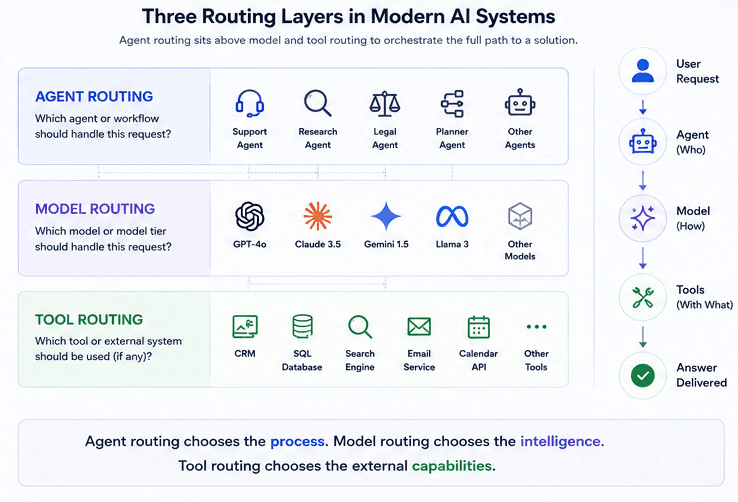
It helps to separate three different decisions that often get lumped together:
Model routing decides which underlying model should handle a request (for example, cheap vs frontier, short‑context vs long‑context).
Tool routing decides which external tools or APIs an agent should call (for example, database vs CRM vs search).
Agent routing decides which agent or workflow should own the request (for example, support agent vs research agent vs safety reviewer), where each agent might itself do its own model and tool routing.
Agent routing sits “above” the other two: it chooses who is responsible for a task, and that chosen agent then decides how to solve it (which models, which tools, in what order).
Here’s a concise side‑by‑side view:
Dimension | Agent Routing | Model Routing | Tool Routing |
Core question | Which agent or workflow should handle this request? | Which model or model tier should handle this request? | Which tool/API should be called (if any) for this request? |
Main unit of choice | Agents (prompts, tools, memory, policies bundled together) | Models or providers (e.g., small vs frontier, cloud vs self‑hosted) | Tools, APIs, databases, services |
Typical signals | Intent, domain, workflow, user/tenant, risk level | Task complexity, context length, latency/cost targets, region | Data type, operation needed (read/write/search), source system |
Where it runs | Orchestrator / planner / router component | Gateway/router layer, sometimes inside agents | Inside agents’ tool‑calling logic or a tool selection layer |
Failure risk | Wrong kind of reasoning or process chosen | Wrong cost/latency/quality trade‑off for a task | Wrong or missing data / side effects |
Example | “Send billing questions to BillingAgent, legal to LegalAgent” | “Short FAQs → cheap model, escalations → frontier model” | “For this step, call |
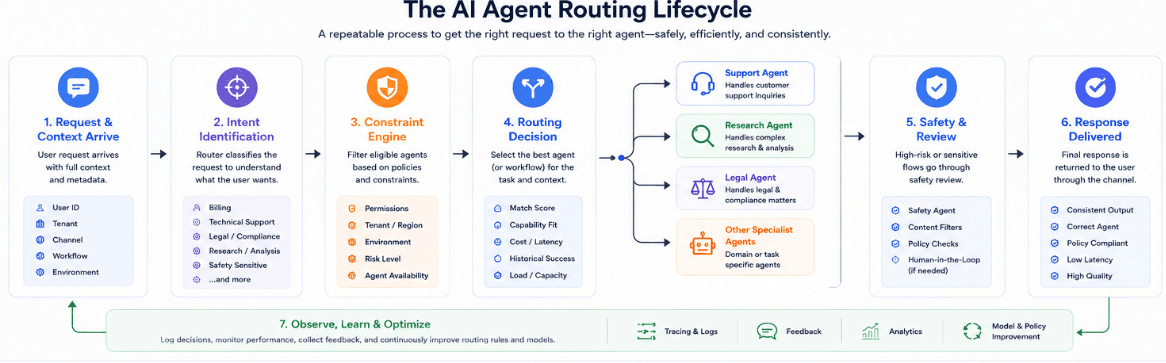
How AI Agent Routing Works
At a high level, AI agent routing turns “who should handle this next?” into a repeatable decision process instead of a one-off if-else tangle.
We find that production systems follow some version of the same loop.
1: A request and its context arrive
The system receives an input like a user message or event along with metadata like:
User ID
Tenant
Channel
Workflow
Environment
This context is just as important as the text itself: “VIP customer in production,” “internal tooling request,” or “EU tenant in finance org” all affect which agents are allowed or preferred.
2: The router identifies what kind of task it is
The routing layer classifies or labels the request so it has a coarse sense of “what’s going on.”
That can be as simple as explicit routes, or as dynamic as an LLM or classifier tagging the task as “billing”, “technical troubleshooting”, “legal”, “safety‑sensitive”, and so on.
3: Constraints are applied before any decision
Before picking an agent, the router filters what’s eligible based on constraints such as:
Tenant or region (e.g., “EU data must stay with EU‑scoped agents”)
Permissions (e.g., “only internal agents can see this internal document”)
Environment (e.g., “no experimental agents in prod”)
Risk level (e.g., “high‑risk flows must pass through SafetyAgent”)
This step trims the candidate list so the router isn’t choosing from everything, just from what’s allowed.
4: The router selects an agent or sequence of agents
With a task label and a filtered candidate set, the router chooses which agent (or chain of agents) should run next.
Some common patterns to look out for:
Simple “one‑shot” routing: pick exactly one specialist agent (BillingAgent, SearchAgent, DraftingAgent).
Planner pattern: send to a PlannerAgent, which decomposes the task and schedules calls to other agents.
Mandatory guardrails: always include a JudgeAgent or SafetyAgent before returning a final answer for certain workflows.
The decision can be rule‑based (if X then Y), LLM‑based (an LLM chooses from a list of agents), or a mix.
5: The chosen agent runs and may route further
The selected agent routes.
It uses its own prompts, tools, memory, and possibly its own model routing decisions.
In some designs, agents can hand off to other agents (e.g., Planner → ResearchAgent → WriterAgent), effectively creating nested routing inside the overall graph.
6: The router logs what happened
After each routing decision, the system records:
Which agent(s) were chosen and which were eligible
Any constraints that applied (region, risk, permissions)
Token usage, latency, and errors for that step
This trace is what lets you later see “how did this answer get produced?” and “why did the router choose that path?”
7: Feedback and evals shape future routing
Over time, you can tie user feedback and evaluation scores back to routes and agents:
If “billing → GeneralSupportAgent” routes have low satisfaction, you adjust rules so billing questions go to BillingAgent first.
If a certain agent’s outputs cause SafetyAgent to block responses often, you adjust routing or agent logic.
Routing stops being static configuration and becomes something you tune with data.
Put together, AI agent routing is less about a single clever algorithm and more about having a consistent place where: context is collected, constraints are enforced, agents are selected, and the whole path is observable. Once that layer exists, improving routing becomes an iterative process instead of a series of ad‑hoc patches inside each agent.
Agent Routing Techniques & Patterns
Here’s the main pattern we always find that teams use in practice.
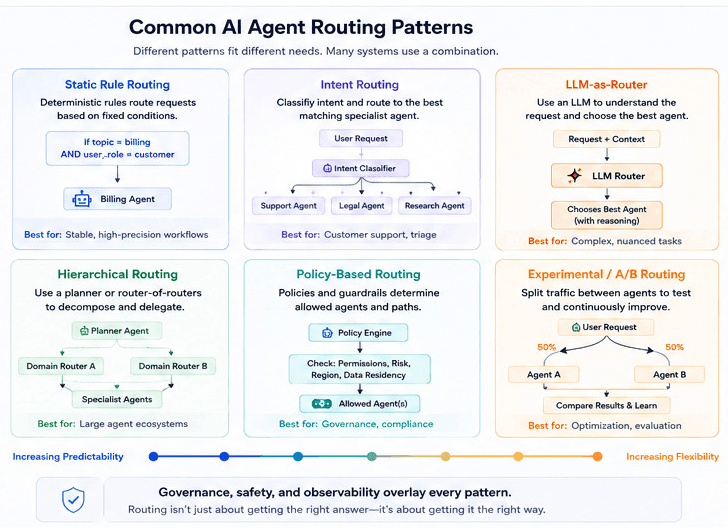
Keep in mind most real systems mix several of these instead of just picking one.
Static, rule-based routing
You define explicit rules like “if URL path starts with /billing → BillingAgent” or “if user is internal and feature flag X is on → InternalHelperAgent.”
Works well when workflows are well-defined, inputs are structured, and you want deterministic behavior that’s easy to reason about and define.
Intent-based routing with classifiers
A lightweight classifier (think of a LLM, model, or heuristic) labels each request. The router maps each request to a primary agent.
Useful when traffic comes through a single entry point but the underlying intents clearly cluster into a known set of domains.
LLM-as-router (semantic routing)
A routing prompt asks an LLM to choose the best agent from a list, often with descriptions of each agent’s capabilities and constraints.
This shines when intents are fuzzy and language is messy. Best when you want the router to reason semantically about which agent is best, at the cost of extra tokens and latency.
Hierarchical routing
Hierarchical routing is where a top-level router or planner chooses a broad category (like support). Then, a second-level router within that category chooses a specific specialist agent.
As a result, it keeps the top-level decision simpler and scales better as the number of agents grows.
Policy-driven routing (governance first)
Routing decisions include hard constraints like “all EU tenants must use EU‑scoped agents,” “PII must always pass through a redaction agent,” or “high‑risk flows must include SafetyAgent before responses are returned.”
In our experience, it’s often implemented as filters that run before any semantic routing, so unsafe or non‑compliant paths are never considered.
A/B and experimental routing
A fraction of traffic is deliberately routed to experimental agents or new prompts to compare performance against the current default.
This turns agent routing into a controlled experimentation surface rather than ad‑hoc trials baked into individual services.
Challenges in Implementing Agent Routing
Even with the right patterns on paper, getting agent routing to behave in production is harder than it looks.
A few challenges tend to show up again and again.
Routing mistakes are hard to see and debug
When a request goes to the wrong agent, the final answer usually looks very plausible. So failures don’t show up as clear errors.
You need good traces that show which agent was chosen, which were eligible, and why the router made that decision, or you end up guessing at why a conversation went off the rails.
Latency and “router tax”
Each routing decision is extra work: classification, LLM‑as‑router calls, planner steps, and sometimes multiple hops between agents.
If you’re not careful, routing can add hundreds of milliseconds or more on top of model latency, especially if you nest routing decisions (router → planner → specialist). The challenge is keeping routing logic as light as possible while still being smart enough to help.
Quality evaluation is non‑trivial
You can’t tell if routing is good just by counting errors or timeouts; you need to know whether the chosen agent produced a better answer than the alternatives. That means building per‑workflow eval sets, tying feedback to routes, and tracking metrics like “user satisfaction or task success by agent and route,” which takes more effort than a single global accuracy number.
Policy and governance add constraints
Real systems have rules: certain tenants can’t hit certain agents, some flows must pass through safety or redaction, and some agents are only allowed in staging. Encoding those constraints in routing logic without creating a tangle of special cases is tricky, and you need a way to update policies without redeploying every time a rule changes.
Keeping routing logic maintainable
It’s easy to start with a clean design and end up with a mess of overlapping rules, hard‑coded checks in individual agents, and routing prompts that nobody wants to touch. As the number of agents grows, you need clear ownership, versioning, and a place to manage routing config centrally; otherwise, every new agent increases complexity more than it increases capability.
Buying vs building an AI agent routing system
Whether to buy or build comes down to how central routing is to your product and how much platform capacity you really have.
You have a relatively small number of agents and workflows, and the routing logic is close to your domain (for example, very product‑specific rules that are easier to express directly in your code).
You already run other critical internal services (gateways, API proxies, internal control planes) and have SRE/platform engineers who can own uptime and observability for another always‑on component.
You have strong constraints that generic platforms don’t yet handle well: bespoke network topology, on‑prem or air‑gapped environments, highly customized agent frameworks, or very specific compliance requirements.
You’re comfortable owning the full lifecycle: designing routing strategies, implementing tracing and evals, adding policy enforcement, and continually updating logic as you add agents or change workflows.
Building your own routing layer makes sense when:
Multiple teams and products share the same agents and model layer, and issues in routing show up as cross‑cutting incidents (misrouted flows, cost spikes, unexpected latency) rather than isolated bugs.
You need routing to work together with model routing, observability, evals, and governance so you can see per‑agent traces, track costs, enforce policies, and run experiments without stitching several tools together.
The rate of change is high: models, agents, and workflows evolve faster than your internal upgrade cycles, and redistributing routing logic across many services starts to feel risky and slow.
You’d rather your engineers focus on agent behavior and product features, not on building and maintaining yet another control plane around routes, policies, and metrics.
Orq.ai’s take on agent routing
Orq.ai is built around the idea that routing isn’t just about picking a model.
It’s about coordinating agents, models, tools, and data as one system. You get an agent runtime that can host planner and specialist agents, an OpenAI‑compatible gateway for model routing, and a shared knowledge base so agents see the same context instead of each one hoarding its own prompts and memories.
We know how hard it is to find routing mistakes. That’s why Orq couples routing with deep observability and evals.
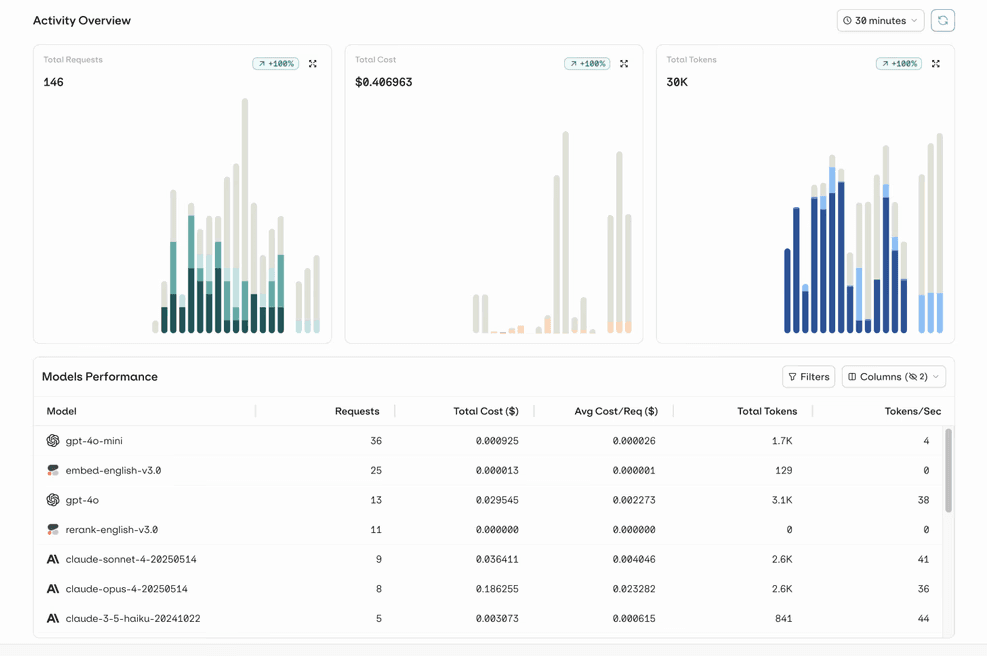
Every agent is traced end-to-end so you can understand things like why billing questions keep going to the general support agent and which routes are actually causing hallucinations or cost spikes.
Make routing a first-class part of your agent system
Once you move beyond a single “do-everything” agent, the real performance gains come from how well you direct work, not just how many agents you add. Treating routing as a first‑class turns a loose collection of specialists into something that behaves like a coherent system instead of a chain of lucky guesses.
If you’re starting to see misrouted conversations, blurry ownership between agents, or growing pressure to explain why a system behaved the way it did, that’s usually the signal to invest in a proper routing layer.
Build production‑grade agent routing with Orq.ai’s AI Gateway and agent runtime by booking a demo here.
FAQs
When should I use rule‑based vs. LLM‑as‑router?
Use rule‑based routing when your workflows are well‑defined (“billing vs tech support”), inputs are predictable, and you want decisions that are easy to explain, test, and audit. Use LLM‑as‑router when intents are fuzzy, language is messy, or you have many overlapping agents and need semantic understanding to pick the best one from a list.
How much latency does routing add?
Simple rule‑based routing or a fast classifier usually adds only a few milliseconds on top of model time, so the impact is negligible. LLM‑as‑router and multi‑step planner patterns can add tens to hundreds of milliseconds per hop, so you need to budget for that and reserve heavier routing for flows that really benefit from it.
Can I use an AI gateway for agent routing?
Most AI gateways are built for model routing (choosing providers and tiers), but they can help with parts of agent routing by centralizing metadata, policies, and traces you can base routing decisions on. The actual “which agent should handle this?” logic usually still lives in your agent runtime or orchestrator, with the gateway acting as the model and policy layer underneath.

Sohrab Hosseini
Co-founder (Orq.ai)
About
Sohrab is one of the two co-founders at Orq.ai. Before founding Orq.ai, Sohrab led and grew different SaaS companies as COO/CTO and as a McKinsey associate.